EloqDoc vs MongoDB - Part 3: Cloud Services (MongoDB Atlas vs EloqCloud)
Comparison of EloqDoc and MongoDB managed cloud services: MongoDB Atlas and EloqCloud
 Ankur TyagiDatabase
EloqDoc vs MongoDB - Part 3: Cloud Services (MongoDB Atlas vs EloqCloud)
In this third part of our EloqDoc vs MongoDB series, we shift focus to the managed cloud services.
If you haven't read them yet, check out Part 1: Architecture and Design and Part 2: Feature Comparison to understand the architectural foundations and feature-level differences.
MongoDB Atlas is MongoDB Inc.'s fully managed database-as-a-service, available on all major cloud providers, which has been around for years. EloqCloud is EloqData's managed service for deploying EloqDoc and EloqKV clusters in the cloud. Using a managed service can drastically simplify the operational burden – no need to manually set up servers, handle backups, or manage scaling; the service takes care of that. However, not all cloud services are equal.
We will compare Atlas and EloqCloud in terms of performance, cost, security, and overall capabilities. The goal is to help you determine which service might be the better fit for your needs, whether it’s getting the most bang for your buck or meeting strict performance and security requirements.
Performance in the Cloud - Benchmark Results
We ran a controlled benchmark to evaluate real-world performance of MongoDB Atlas and EloqCloud (powered by EloqDoc). Both systems were tested under identical conditions:
- Same dataset: 10 million records
- Same YCSB workload config
- Same concurrency levels: 64, 128, 256 threads
- Same hardware tiers: AWS us-west1 c5n.2xlarge (8 CPU cores, 16GB memory)
- Workloads evaluated: Read-only, Read-write (50/50 mixed), and Write-only
Key Findings
EloqCloud consistently delivers higher throughput across read, write, and mixed workloads, even as concurrency rises.
Throughput (QPS) - 2 cores / 16GB
Read-only Workload
As concurrency increases, Atlas read throughput declines while EloqCloud continues to scale. At 256 threads, EloqCloud sustains nearly 2× the throughput of Atlas, maintaining efficiency under parallel access instead of tapering off under load.
Read-Write (Mixed)
Under mixed traffic, EloqCloud more than doubles throughput relative to Atlas across all concurrency levels. The performance gap widens as threads increase, indicating a commit path that handles parallel reads and writes without significant coordination overhead.
Write-only
Write throughput on the Atlas plateaus quickly. EloqCloud continues to grow linearly, achieving over 2× throughput at 256 threads.
Throughput (QPS) - 8 cores / 64GB
Read-only
At lower concurrency levels, performance between the two systems remains comparable. At higher thread counts, EloqCloud maintains throughput while Atlas begins to taper, resulting in a measurable advantage at 256 threads.
Read-Write (Mixed)
Increasing CPU capacity improves throughput for both engines, but EloqCloud converts the additional compute into greater sustained throughput. At peak concurrency, EloqCloud delivers approximately 46% higher mixed-workload throughput.
Write-only
Write-heavy workloads show continuous gains on EloqCloud as threads scale. Atlas increases initially but flattens at higher concurrency levels. EloqCloud continues to experience upward growth, achieving even higher throughput at 256 threads.
Latency Results (P50 & P99)
2c/16GB (Read Latency)
Latency grows sharply on Atlas as concurrency increases. EloqCloud exhibits stable tails and significantly lower medians, resulting in faster response times and improved performance under load.
8c/64GB (Read Latency)
Median (P50) latency on EloqCloud remains significantly lower, especially under high concurrency, where Atlas latency rises sharply. Tail latency (P99) readings vary depending on the cache state and burst pattern, but median values consistently favour EloqCloud, indicating a faster response under load conditions.
Cost and Pricing Differences
Cost is often the make-or-break factor when choosing a cloud service. Let’s compare the cost models of Atlas and EloqCloud, and how each architecture influences costs.
MongoDB Atlas Pricing Model
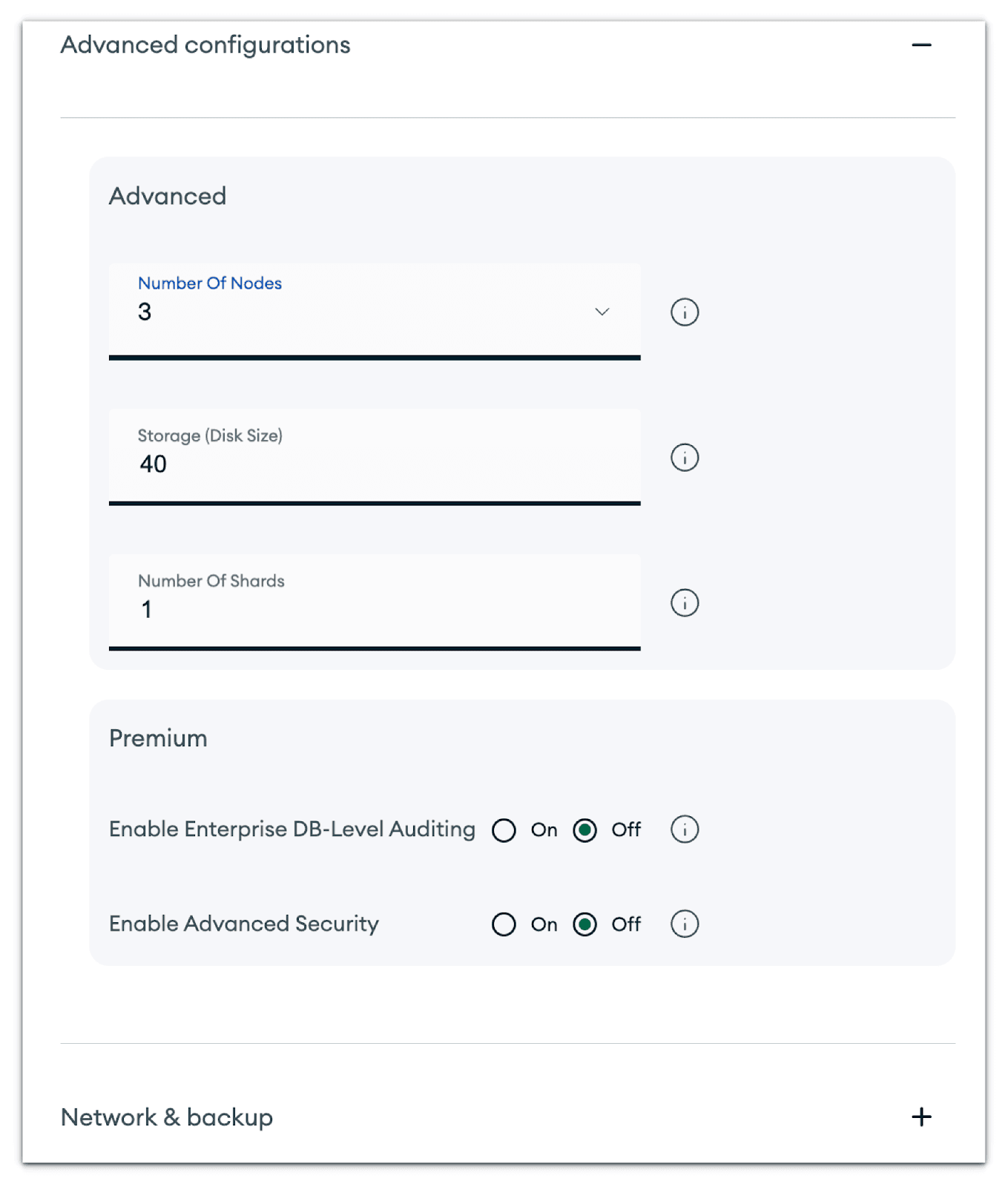
Atlas uses a usage-based pricing, but essentially, you pay for the size of the cluster you provision (even if you’re not using it entirely). You choose a tier (which corresponds to a specific VM size for the MongoDB nodes and the number of nodes, typically a minimum of 3 for a replica set).
For example, an M30 cluster might cost a few hundred dollars per month, an M50 more, and so on up to multiple thousands for large clusters.
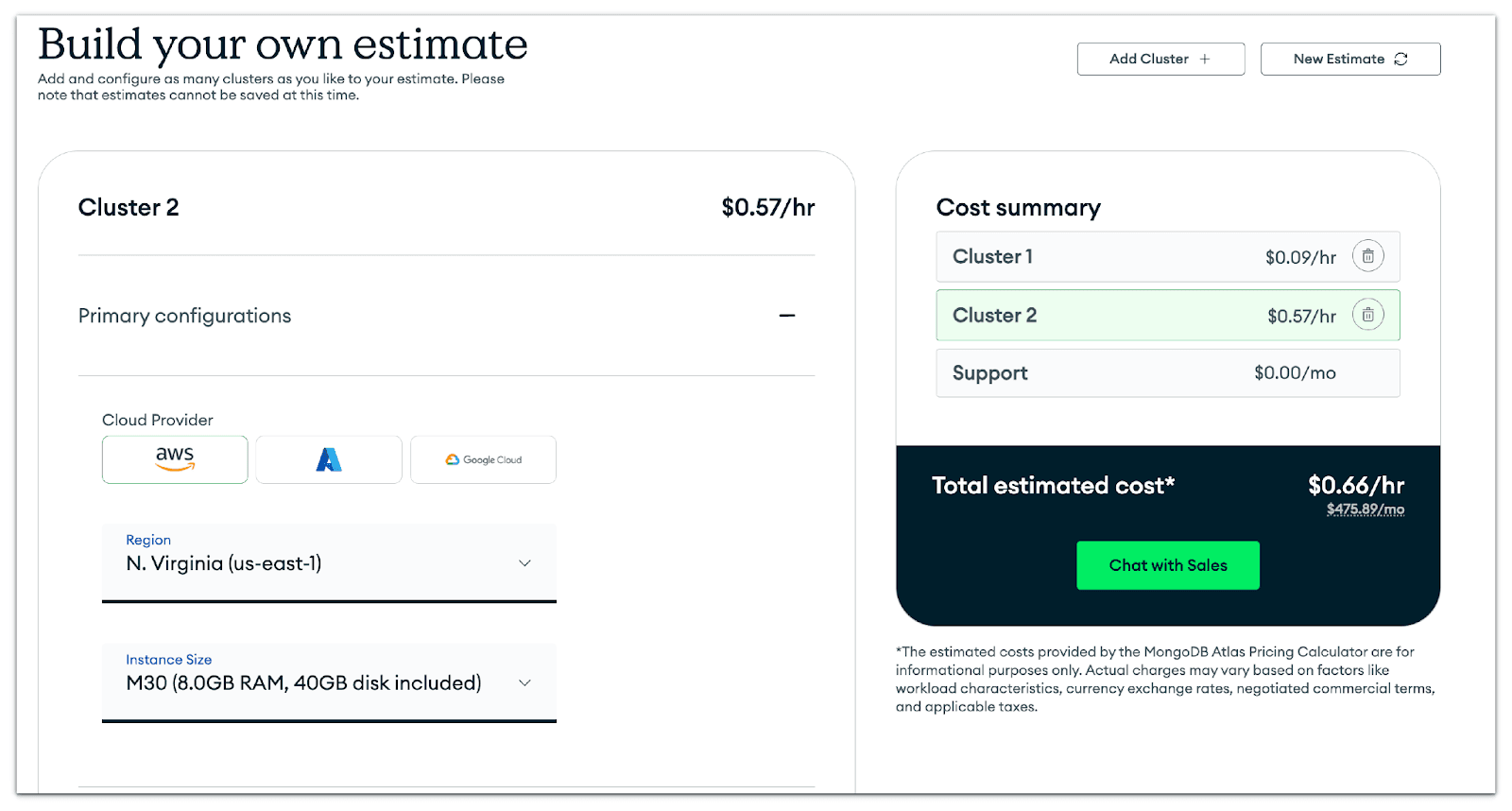
You’re also charged for the storage allocated (with a certain amount included per tier) and any backup storage. Data transfer (network egress) is another cost if you have a lot of traffic leaving the data center, or for certain backup restores. Atlas does offer an auto-scaling option and even a serverless option (pay per operation), but the serverless pricing can be relatively high if you have a steady load (it’s more for spiky or intermittent workloads).
In Atlas, because each production cluster is a replica set with at least 3 nodes, you are inherently paying for 3 copies of your data to be stored (which is good for safety, but it means if you have 1 TB of data, you’re actually using 3 TB across the nodes, and your storage bill and backup will reflect that redundancy).
EloqCloud Pricing Model
EloqCloud is designed to be very cost-effective and flexible. The big difference is that EloqCloud’s architecture doesn’t require multiple full copies of your data on different nodes – the primary copy of data is in an object store (S3). EloqCloud’s use of cheap object storage drastically reduces storage cost for the end user.
For example, Amazon S3 costs roughly $0.023 per GB-month (and that includes auto replication across availability zones). By contrast, an equivalent amount of SSD storage (like EBS gp3) might cost around $0.10 per GB-month or more, and if you have 3 replicas, effectively $0.30 per GB-month for protection.
EloqCloud provides the durability of multiple copies at a cost comparable to that of a single, inexpensive copy on object storage. This approach can yield up to 90% storage cost savings.
Additionally, EloqCloud pricing is very granular and elastic.
They offer a generous free tier: at no cost, you can run up to 3 clusters with a total of 25 GB storage, and they even allow significant throughput (up to 10k reads and 1k writes per second) on that free tier.
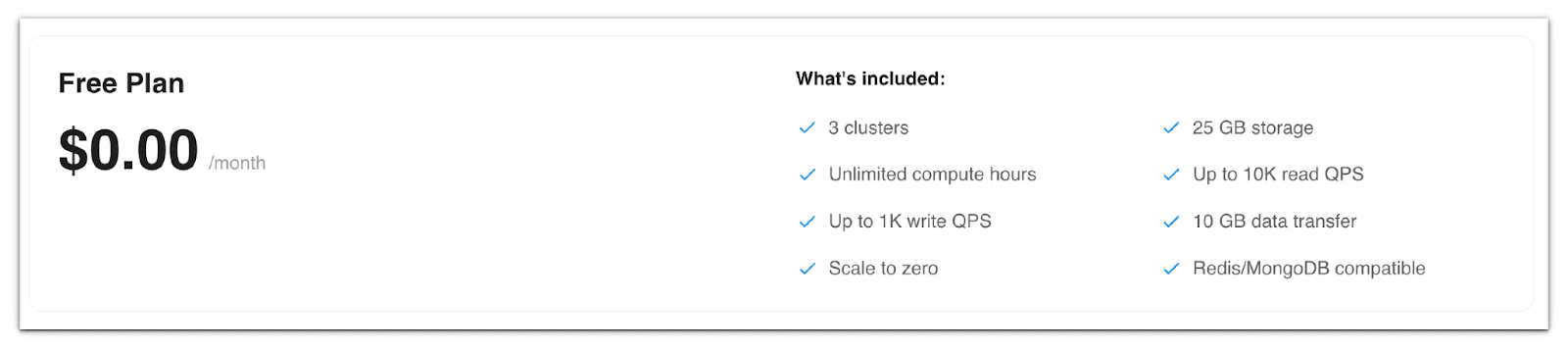
It’s “free forever” for a decent workload, not just a tiny development sandbox. (MongoDB Atlas’s free tier, in comparison, is limited to 0.5 GB and is really just for light testing.)
Their paid tiers include a certain amount of storage and “compute hours” with the ability to scale to zero. “Scale to zero” means if your database is idle, it can shut down compute to save you money – something Atlas does not do for a cluster (Atlas requires your cluster always to have at least one primary and one secondary running).
The pricing is broken down by storage ($0.10 per GB beyond the included amount) and compute hours ($0.14 per hour beyond the included amount). They also include some amount of data transfer free.
These rates are competitive; for instance, $0.14 per compute hour is roughly $100/month per compute instance (1 compute unit = 1 vCPU, 8GB RAM).
The Enterprise tier of EloqCloud offers SOC2 compliance, SLA, priority support, and private networking at a base monthly rate of $999 for companies requiring compliance and custom SLAs.
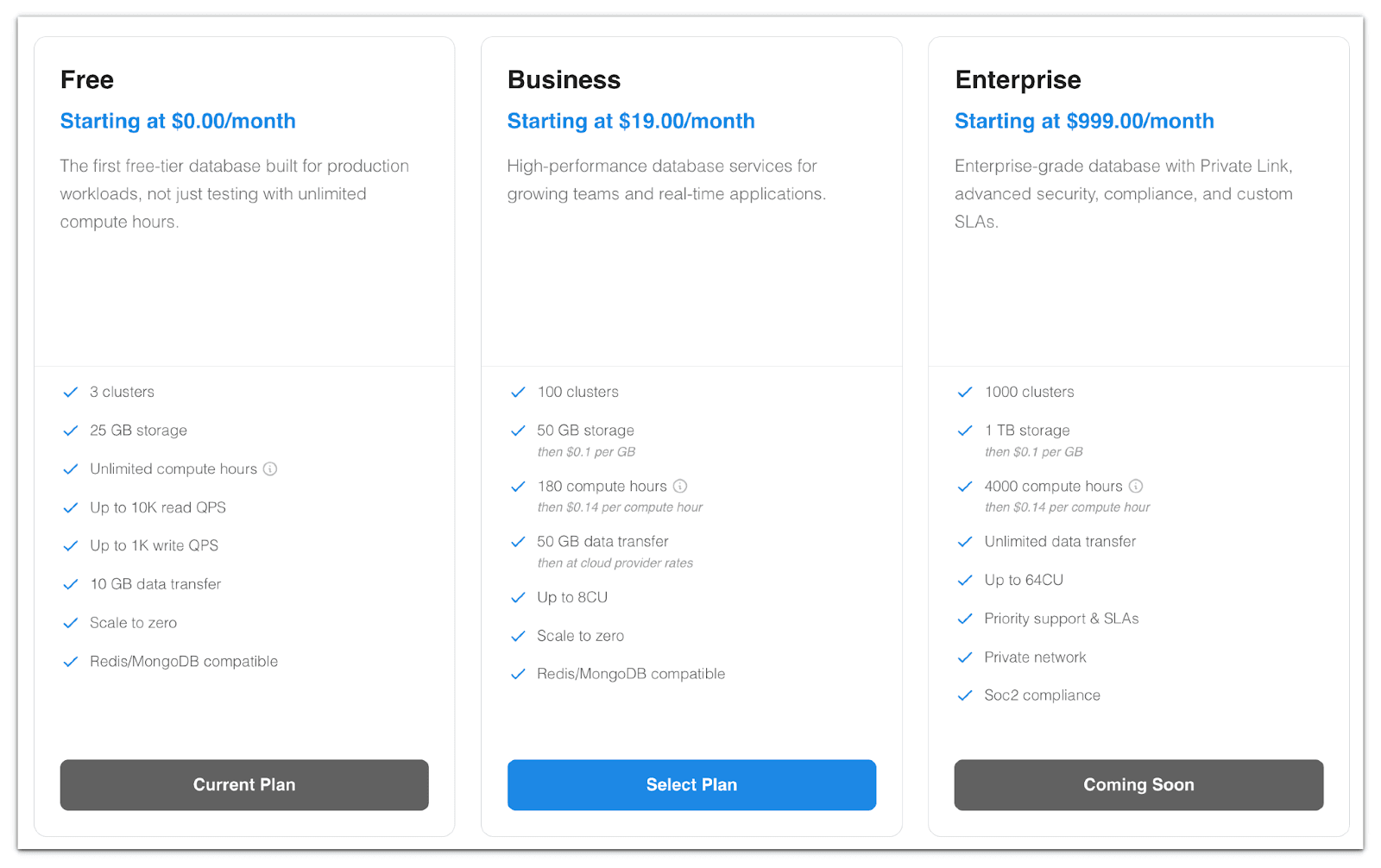
EloqCloud positions itself as a significantly more cost-efficient alternative to Atlas. By decoupling storage, they minimize the cost of keeping data (you essentially pay near raw storage costs). By allowing scale-to-zero and granular compute hour billing, they ensure you don’t pay for idle capacity. Atlas, while convenient, can become costly because you’re often running 3 nodes 24/7, even if your usage is sporadic.
A scenario to illustrate costs
If you have a dataset of 100 GB and an application that during peak hours needs a lot of throughput, but is hardly used off-peak.
On MongoDB Atlas, choose an M50 cluster with 3 nodes, each having maybe 160 GB of storage (to fit 100 GB and allow growth). You pay for those nodes full-time.
Let’s say that’s on the order of $ 1.50 to $ 2/hour for the cluster (just ballpark), which in a month is $ 1,000 to $ 1,500.
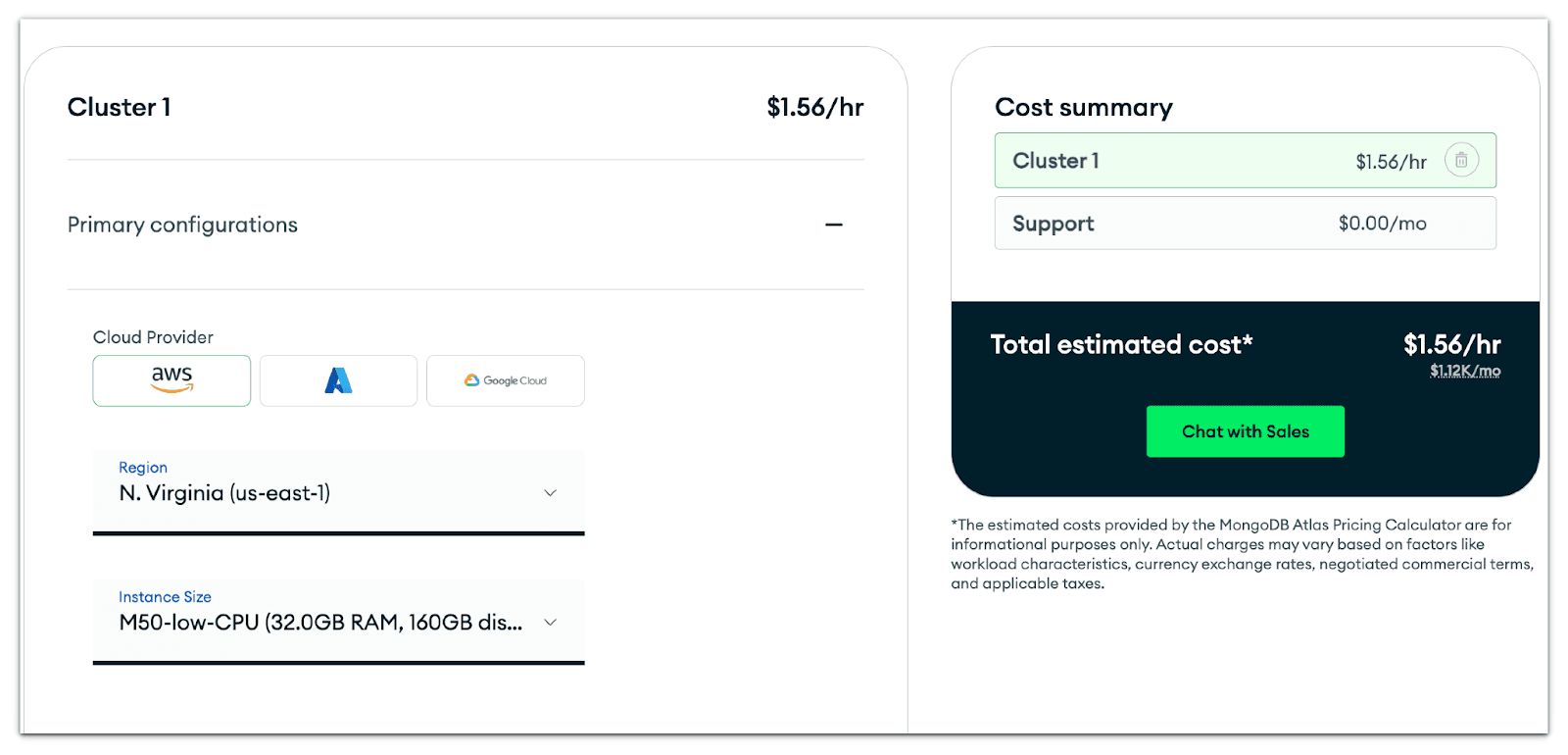
That covers compute and storage (with redundancy). If you’re not using it at night, tough – it’s still running (unless you tear down the cluster or scale manually).
EloqCloud decouples compute from storage:
- Data is stored in object storage (at a cost of only $0.10/GB).
- Compute containers scale up during peak periods and scale to zero during idle times.
- You pay per compute hour, not per always-on node.
For our scenario:
Storage: 100 GB for $10/month
Compute:
- Peak = 6 hours/day
- Total = 180 hours/month
- Business plan includes 180 compute hours
- Off-peak = 18 hours/day (scale-to-zero)
Total monthly bill: $19 (Business Plan) + $10 (storage) + $0 (compute) = $29 per month
The difference comes from the fact that EloqCloud charges for compute only when the workload is actively running.
If You Need More Compute
Let’s extend the scenario to workloads with 10 peak hours/day and 300 compute hours/month.
Your monthly compute cost might end up significantly lower, and you’ve saved dramatically on storage costs. Even if you keep some nodes always on, the storage difference plus cheaper compute could easily cut your bill by a large fraction.
One more thing - licensing costs
MongoDB’s server license (SSPL) doesn’t charge you directly, but if you wanted an Enterprise feature (like encryption at rest on-prem), you’d need to pay for Enterprise. In Atlas, those features are included in the service cost. EloqDoc, being AGPL, has no licensing cost for usage.
If cost optimization is a top priority and you have the flexibility to try a newer service, EloqCloud is extremely attractive. Especially noting that EloqCloud even offers things like a free tier for real usage - something basically unheard of with Atlas for production-scale work.
Atlas is the more expensive option, but it comes with the backing of MongoDB Inc., a longer track record, and a larger ops team behind it. Some companies are willing to pay a premium for that peace of mind or because they require specific enterprise support.
But if you’re looking to maximise database performance per dollar, EloqCloud makes a strong case.
Security and Compliance in the Cloud
Security in a managed service context means not just the database’s features but also the cloud platform’s measures. Both Atlas and EloqCloud know that users entrust them with critical data, so they provide robust security configurations.
MongoDB Atlas Security
- Atlas runs your databases in isolated virtual private cloud instances. You typically configure network access so that only your application servers (or IP addresses you specify) can connect to the database. Atlas supports VPC peering and even AWS PrivateLink for private connectivity.
- All Atlas clusters have TLS encryption for client connections by default.
- Atlas automatically enables authentication (you must create database users), and you can enforce complex passwords or integrate with identity providers for single sign-on (for Atlas admin).
- Data at rest in Atlas is encrypted using cloud provider’s disk encryption (and Atlas can manage the keys or integrate with AWS KMS for customer-managed keys if on specific plans).
- Atlas also features advanced security options, including auditing, LDAP integration for database authentication, and fine-grained roles, available with the Atlas Enterprise tier.
- Importantly, Atlas has a slew of compliance certifications: SOC2, GDPR, HIPAA (with signing a BAA), etc., making it suitable for regulated industries.
EloqCloud Security
- EloqDoc’s built-in security features (authentication, TLS, access control) are applied in EloqCloud. When you deploy a cluster, you’ll create users with passwords or keys just like in MongoDB. Communications between EloqCloud nodes and clients are encrypted via TLS.
- Data in object storage is encrypted server-side by default (all major cloud providers do this, and some also allow customer-managed keys for object storage). EloqCloud’s Enterprise plan will enable you to bring your own encryption keys or add additional encryption layers if needed. Also, any ephemeral data on SSDs would be on encrypted volumes managed by EloqData.
- As a relatively new service, EloqCloud does not yet hold all compliance badges. However, the Enterprise plan explicitly mentions SOC2, which means we are subject to an audit for security best practices.
- One notable security aspect of EloqCloud’s architecture is that, since the primary data is stored in object storage, even if a compute node is compromised, it retains only a subset of cached data (and possibly not even in a human-readable form if it’s in a binary format in memory or on disk). Object storage access can be tightly controlled with IAM roles.
Data Recovery and Reliability
Both services replicate data across zones by default - Atlas via replica sets, EloqCloud via storing in cross-zone object storage and redundant logs.
User Control One key difference is how each platform exposes infrastructure.
On MongoDB Atlas, you do not have access to the underlying VMs or operating system; everything is abstracted behind the Atlas control plane. This means OS-level operations (file system access, custom auditing agents, kernel tuning, etc.) are not available; you rely on Atlas-managed features only.
EloqCloud operates similarly, as you also do not receive OS-level access. Its compute layer is stateless, auto-managed, and infrastructure-abstracted, so users interact with the database only through the provided connection string and the EloqCloud control plane.
- Both platforms provide a fully managed environment where you administer the database through their UI and API.
- Both Atlas and EloqCloud allow you to restrict access by IP, require TLS, and so forth, which are standard for any DBaaS.
- Both services provide a secure environment out of the box. You should always follow best practices (use strong passwords, limit network access, turn on audit logs if needed, etc.), which you can do on both platforms.
Ease of Use and Additional Features
How do Atlas and EloqCloud compare in terms of user experience and extra bells and whistles?
Atlas User Experience
- Atlas has a polished web UI and integrations. You can deploy a cluster with just a few clicks, monitor performance metrics in real-time, set up alerts (e.g., if CPU usage is high or disk space is low), and manage backups through the UI.
- Atlas offers numerous convenience features, including one-click full-text search index creation (Atlas Search), a built-in Data Lake for querying across clusters or performing federated queries on S3 data, and charts for creating dashboards. It’s an entire ecosystem.
- They also offer a mobile/edge sync (Realm) if needed, as well as various other add-ons. These may not be directly related to database performance features, but they cater to developers who want a one-stop platform.
EloqCloud User Experience
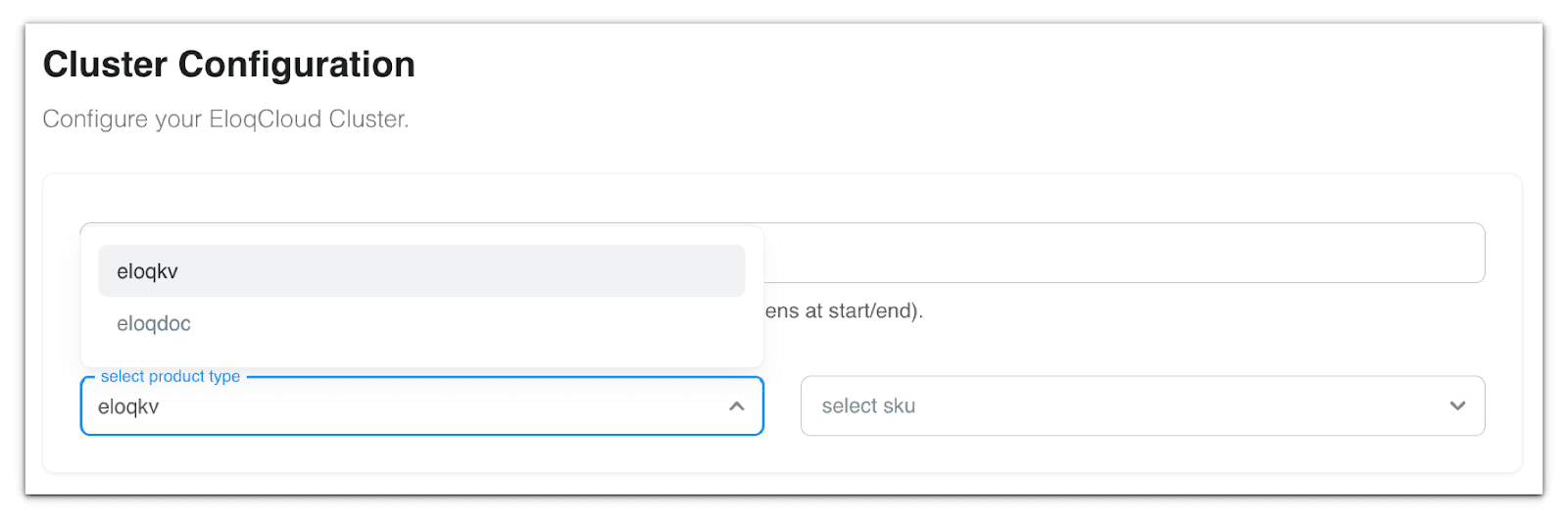
EloqCloud, being newer, is focused on core database service. The basics are there: you can easily create a cluster (select your cloud and region, e.g., AWS us-west), define its size, and get a connection string.
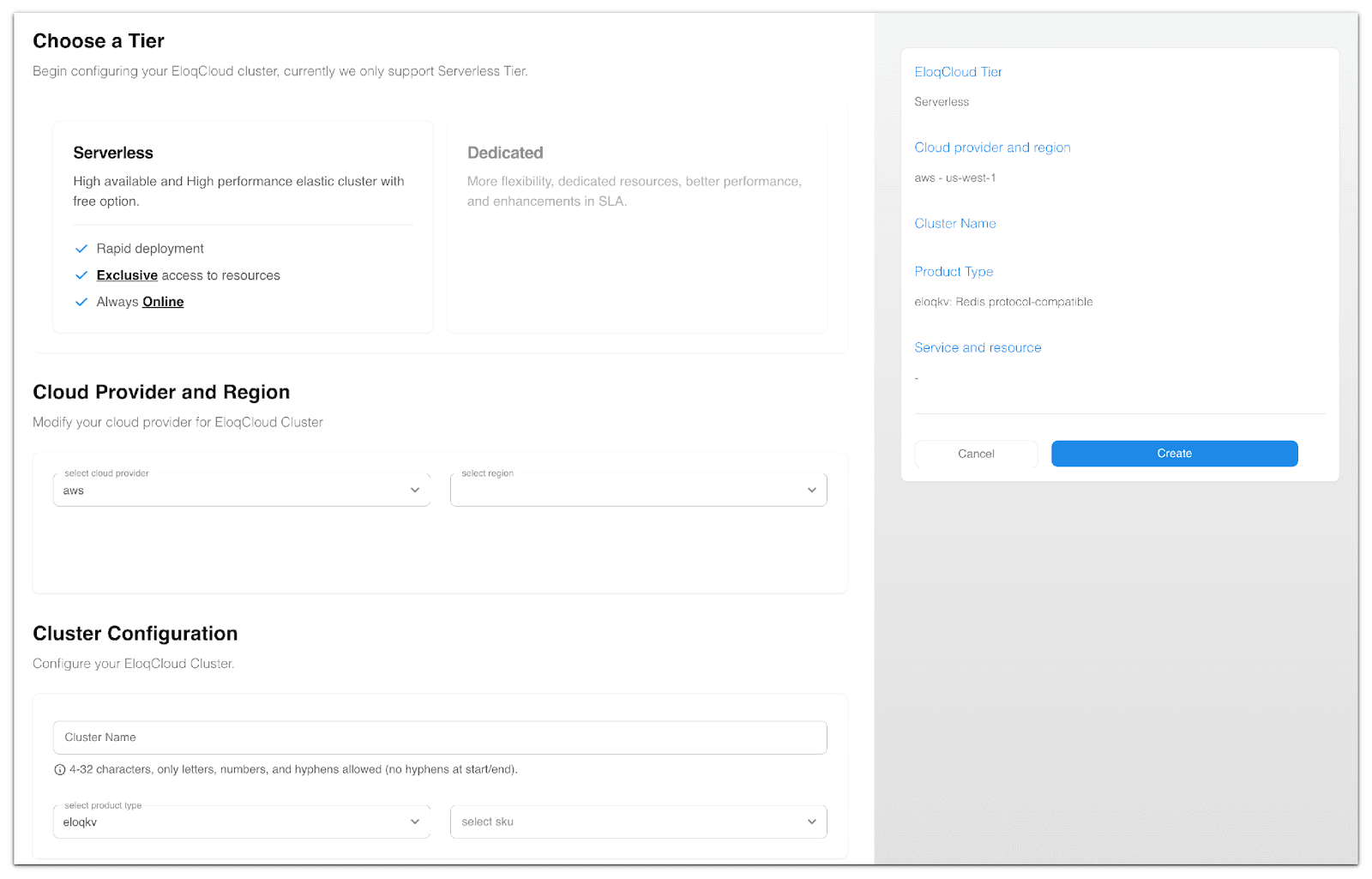
EloqCloud also provides a built-in Serverless monitoring dashboard, giving you real-time visibility into core metrics, such as cache hit rate, memory usage, cluster health, and cloud-region details, all in one place.
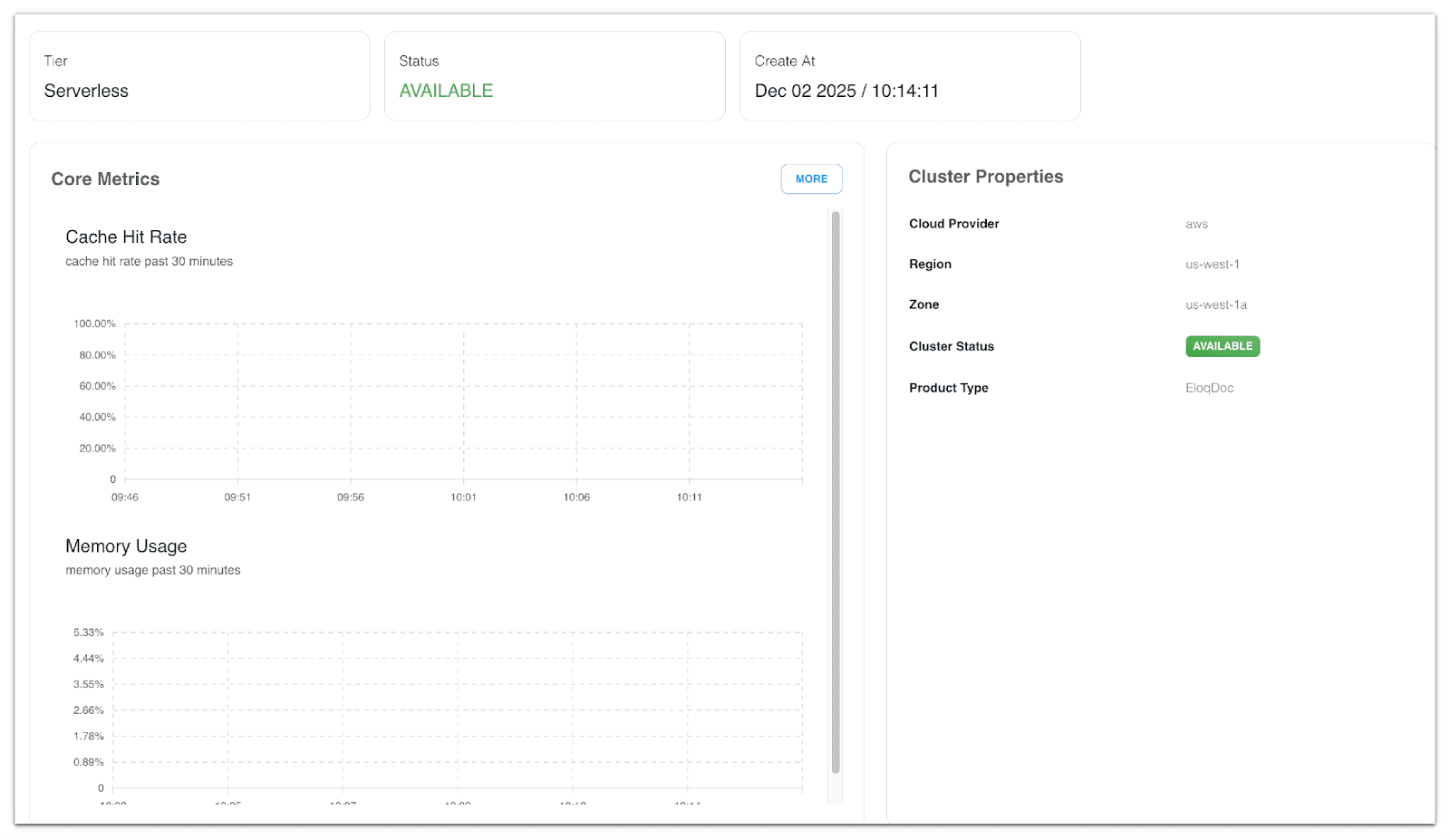
They support “scale to zero” and serverless-like operation, which is a user experience advantage if you want automatic cost savings on low usage.
EloqCloud integrates with EloqData’s other offerings, including EloqKV (Redis API) and EloqDoc, all of which fall under the EloqCloud umbrella. So, if you wanted a multi-model setup (document, cache, and relational), EloqCloud could be a unified solution for that.
Support & Community
- With Atlas, you have the backing of MongoDB’s support, which is available only to those on a paid plan (and their support is generally solid, given their extensive experience). There’s also a huge community if you need help with a MongoDB question (though for Atlas-specific issues, you should contact support).
- EloqCloud is supported by EloqData’s team. As a smaller company, they provide more personalized support. They have Discord for the community, etc. The community is growing. You may enjoy direct interaction with the EloqData team and community.
Conclusion: Atlas or EloqCloud?
Both MongoDB Atlas and EloqCloud are impressive in their own ways, but your choice will hinge on your priorities:
Choose EloqCloud if cost and performance are top priorities, or if you’re excited about the technological advantages of EloqDoc. EloqCloud can offer significant savings for data-heavy or variable workloads, and as we saw, it can deliver superior performance at scale.
It’s an excellent choice for start-ups and growing projects where you need to maximize every dollar and achieve scalability without a massive budget. Additionally, if you want the flexibility to move on-prem or to other clouds later (thanks to EloqDoc being open source), EloqCloud gives you a path without lock-in.
Choose MongoDB Atlas if you value a tried-and-true service with a rich feature set and are willing to accept the higher cost. Atlas is ideal for teams that want a “set it and forget it” solution backed by MongoDB’s reputation, or who need those extras like built-in analytics, charts, or a multitude of compliance certifications. If your company already uses Atlas widely, consolidating on it could make sense despite the cost.
One strategy could be: start with EloqCloud on its free tier (since it’s surprisingly generous, you can run a real production app on it at no cost up to certain limits) and see if it meets your needs.
You’re not losing anything by trying, given the API is MongoDB-compatible. If down the line you outgrow it or need features it doesn’t have, you could still consider switching to Atlas or another solution.
For those already on Atlas and feeling the pain of the bill or hitting performance ceilings, EloqCloud (or self-managed EloqDoc) is an intriguing alternative. Migration would involve some effort (data sync and testing), but since the application interface remains the same, it’s one of the more straightforward migrations you could undertake in the database world.
Final thoughts
Atlas has set the standard for cloud MongoDB services, but EloqCloud is bringing fresh competition by addressing many cost and scalability issues upfront. In my perspective, if your application aligns with the strengths of EloqDoc (distributed ACID, cloud-native scaling) and you’re not tied into proprietary Atlas features, giving EloqCloud a shot could reap major rewards in performance and savings.
Brands Our Founder Previously Worked With: