How to build a production-ready voice agent platform with LiveKit, OpenAI Realtime, Cartesia, and Node.js
Build a production voice agent with LiveKit transport, OpenAI Realtime, Cartesia Sonic-3 speech, and Node.js orchestrating tools and persistence.
 Rishi Raj JainWeb Development
Getting a voice agent to respond is one thing. Building one that feels stable, fast, and usable in a real product is something else entirely.
Once you get beyond the prototype or demo phase, the challenge shifts from simply making your model talk to tackling real system design. Now, you need a user-friendly frontend that can handle live audio without hiccups, a real-time layer to keep conversations stable, a backend that manages tools and business logic effectively, and a speech pipeline that holds up when latency, audio quality, and consistency start pulling in different directions.
On top of that, you still need a place to store session data, transcripts, and the operational signals that help you understand what is actually happening in production.
We’ll build that system with LiveKit, OpenAI Realtime, Cartesia, and Node.js. LiveKit handles the frontend connection and real-time session flow. OpenAI Realtime handles speech understanding and response generation. Cartesia handles the final voice output. Node.js ties the rest together through session setup, orchestration, and backend logic.
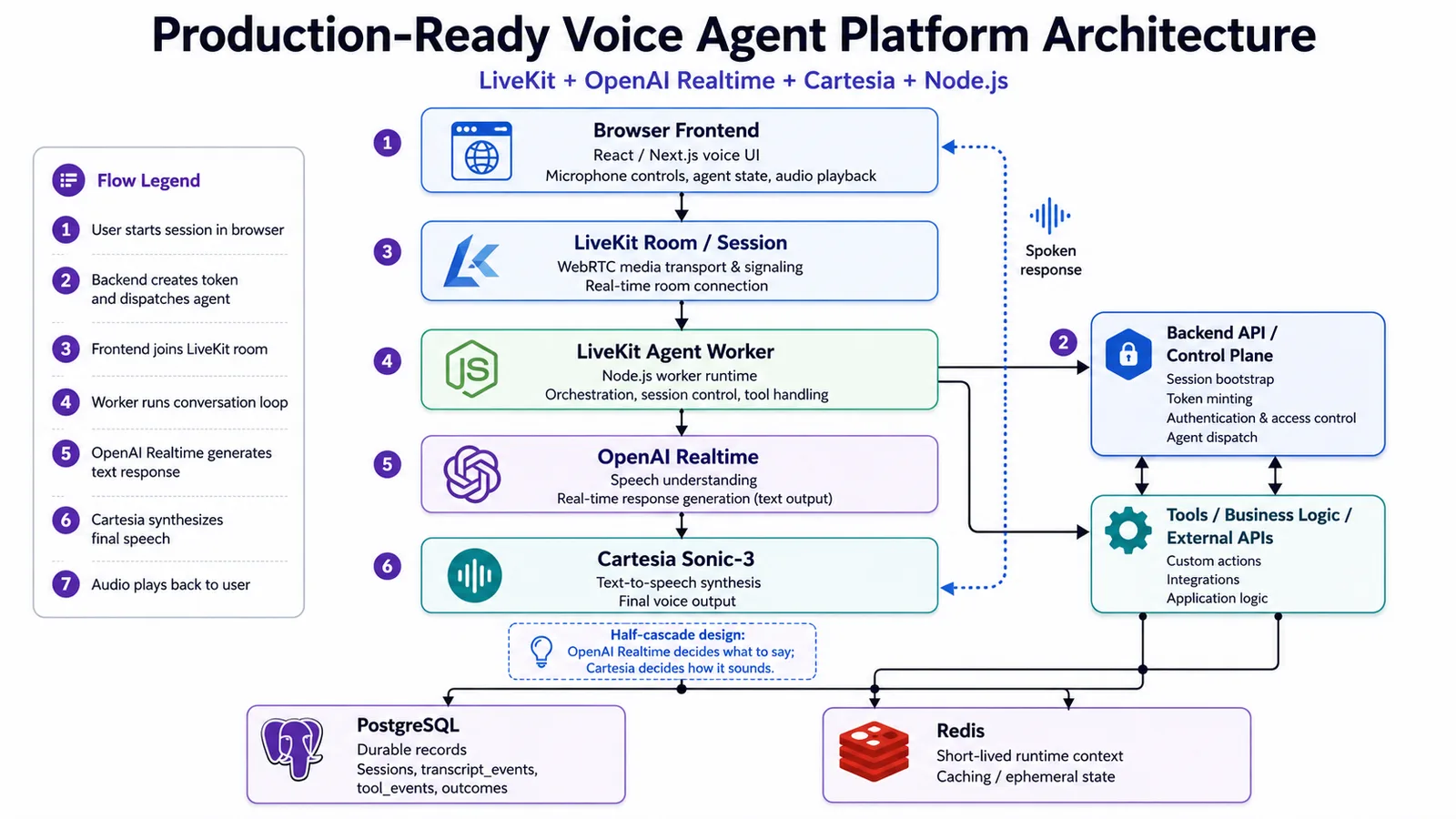
We’ll use a half-cascade design. Rather than letting the real-time model generate the final voice output, we’ll configure OpenAI Realtime to return text, which we'll then send to Cartesia Sonic-3 for synthesis.
That gives us a nice balance: we keep the responsiveness of real-time speech interaction, while gaining more control over how the agent actually sounds. If you’d like to dive into the code first, you can find it in this repository.
Understanding the architecture choices for voice agents
Before jumping into the build, it’s worth slowing down for a minute and looking at the main ways voice agents are designed today.
On the surface, most voice agents do the same thing: listen to a user, figure out what they said, generate a response, and speak back. But under the hood, there are a few very different ways to make that happen. The architecture you choose affects everything from latency and voice quality to how easy the system is to debug and improve later.
For this project, three approaches matter most: the classic STT > LLM > TTS pipeline, full speech-to-speech systems, and the hybrid setup, often called a half-cascade architecture. The classic Speech-to-Text > Large Language Model > Text-to-Speech pipeline is the architecture most people are familiar with.
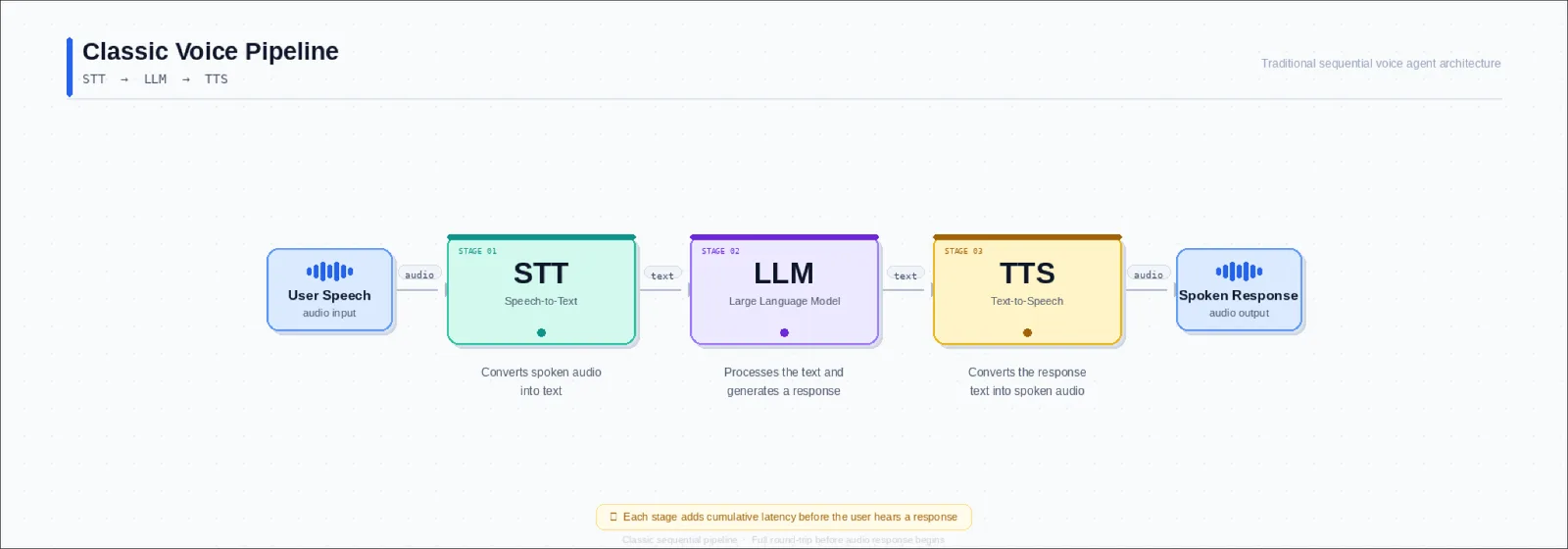
A user speaks, the system transcribes that audio into text, the language model generates a text response, and then a TTS engine turns that response back into speech.
This approach has been popular for a reason. It is modular, predictable, and easy to work with. Each part of the pipeline has a clear job. If you want a better transcription provider, you can swap the STT layer. If you want a more natural voice, you can replace the TTS engine. If you want better reasoning, you can change the model. You are not locked into a single system that does everything.
Full speech-to-speech systems
The newer alternative is to let a real-time model handle the voice interaction more directly.
Instead of passing through separate STT, LLM, and TTS stages, the model works in a more continuous speech loop. It takes audio in and produces audio out during a real-time interaction.
This is what people usually mean when they talk about speech-to-speech systems.
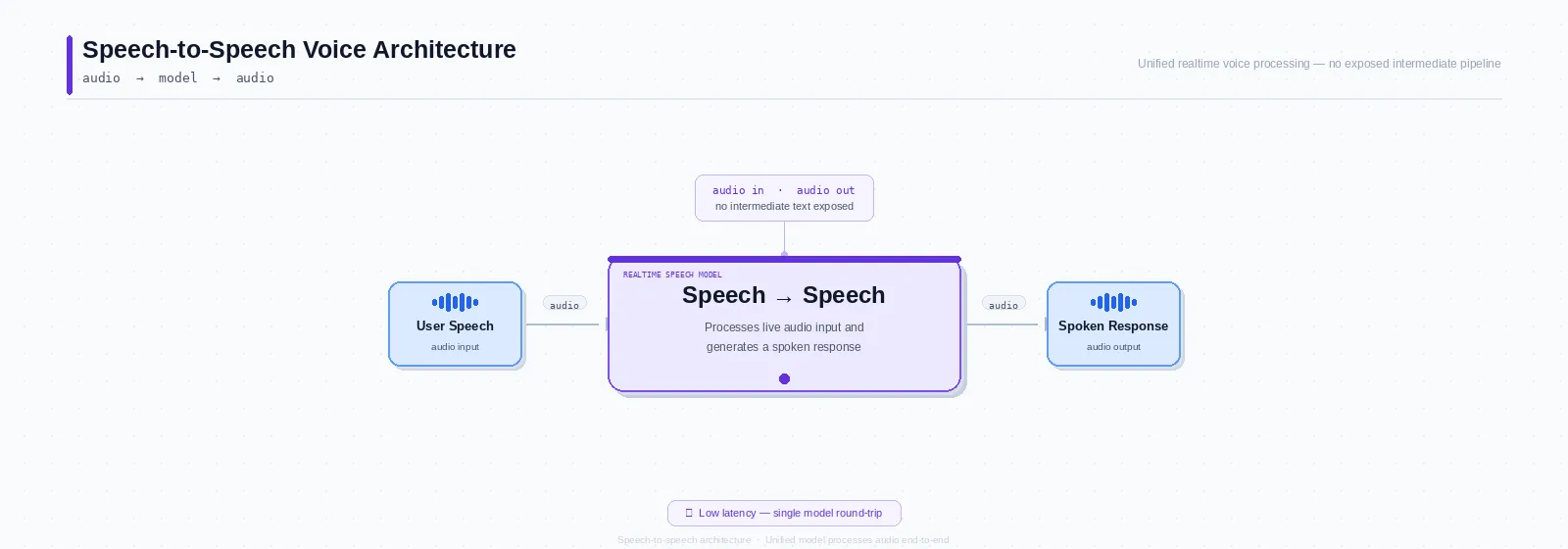
The big appeal here is responsiveness. These systems are designed to feel more conversational. They are often better at quick turn-taking, interruptions, and back-and-forth dialogue that feel closer to talking to a live assistant than waiting for a chain of services to finish processing.
That said, the convenience comes with tradeoffs. When one system handles both the conversational logic and the final spoken output, you usually have less control over the voice layer itself.
The half-cascade approach
Instead of going fully modular or fully speech-to-speech, we use a half-cascade architecture.
In this setup, the system still benefits from real-time speech understanding, but the final voice output is handled separately.
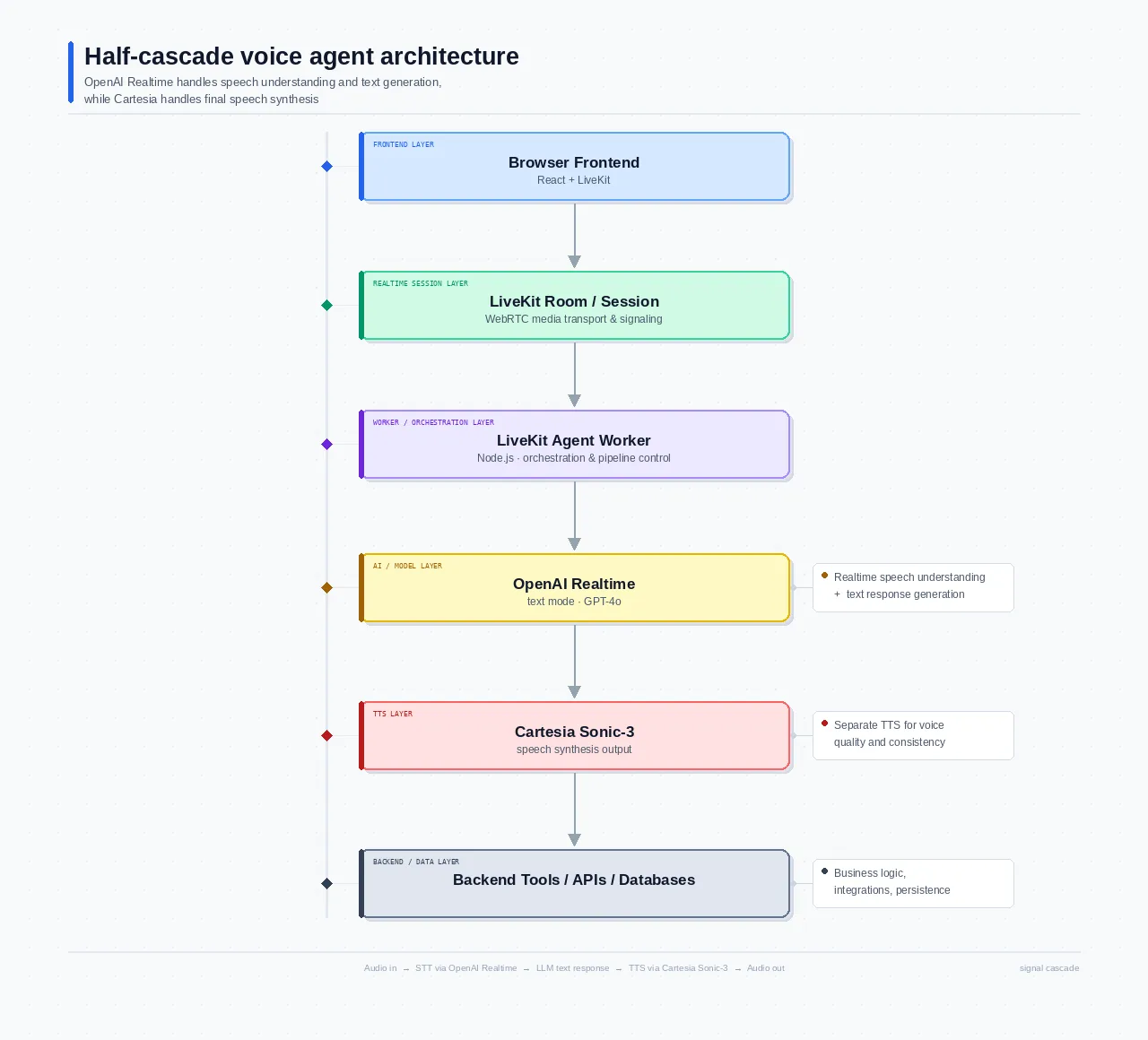
Here’s what that means in practice:
- The user speaks
- OpenAI Realtime handles the live speech understanding and generates the response as text.
- Cartesia Sonic-3 takes that text and turns it into speech
So rather than letting the real-time model produce the final audio directly, we split the architecture's output. The model decides what to say, and Cartesia decides how it sounds.
This split gives us some of the speed and responsiveness of a modern real-time voice system, while still preserving control over the speech layer. We are not forced into a fully cascaded pipeline, but we are also not giving up the ability to tune voice output independently.
Why LiveKit is part of the stack
At first glance, OpenAI Realtime should be enough. If it already handles live voice interaction, why add another layer?
The reason is that OpenAI Realtime handles the model interaction, not the full application around it. It is great at low-latency speech understanding and response generation, but a production voice product needs more than that.
LiveKit fills in the rest of that system. It gives you:
- A frontend layer, which matters because a real voice product needs a browser or mobile experience with microphone access, audio playback, and usable controls.
- WebRTC transport, which matters because voice apps need reliable real-time audio delivery, not just model responses.
- Session management matters because starting a voice interaction involves more than connecting to a model; you need to create the session, join the room, and clean up properly when it ends.
- Authentication and access control make sure only the right people join the right session.
- Room-based runtime lets the user and agent share a real-time space for audio and messages.
- Agent state in the frontend, which matters because a good voice UI should show whether the agent is connecting, listening, thinking, or speaking.
- Worker orchestration, which matters because the agent in this architecture runs as a backend worker that needs to be dispatched into a room when a session starts.
LiveKit is what turns that model capability into something you can actually build a custom frontend and production runtime around.
Project setup and prerequisites
Before getting into the agent logic, it helps to understand how the project is laid out and what must be in place before any of it can run.
This is not a single-app setup. The codebase is a small monorepo with three separate applications: the web frontend, the API server, and the worker that runs the agent. There are also shared packages for common types and config helpers. At the top level, the project looks like this:
Most of the control stuff happens in the API server, that’s where sessions start, and tokens come from. The worker handles the day-to-day action: the agent joins rooms, listens, thinks, and talks there. The frontend is the doorway for users to access the system.
There are a few external pieces you need in place before the app can work locally.
At a minimum, the project expects:
- Node.js 20+
- PostgreSQL 14+
- Redis 7+
- A LiveKit Cloud project
- An OpenAI API key
- Access to a real-time capable OpenAI model
- A Cartesia-compatible TTS setup through the worker configuration.
Environment files
Instead of stuffing every variable into one root file, each service gets the configuration it actually needs. The minimum required variables include:
LIVEKIT_URL="wss://your-project.livekit.cloud"
LIVEKIT_API_KEY="your-livekit-api-key"
LIVEKIT_API_SECRET="your-livekit-api-secret"
LIVEKIT_AGENT_NAME="voice-agent" # OpenAI OPENAI_API_KEY="sk-..." OPENAI_REALTIME_MODEL="your-realtime-model"
CARTESIA_API_KEY="your-cartesia-api-key"
DATABASE_URL="postgresql://user:password@localhost:5432/voice_agent"
REDIS_URL="redis://localhost:6379"
NEXT_PUBLIC_API_BASE_URL="http://localhost:8000"
A few of those are especially important to get right. For example, the LIVEKIT_AGENT_NAME has to match between the server and the worker, because the server includes agent dispatch metadata when it starts a session, and the worker is registered under that name.
If those values drift apart, the frontend may connect successfully, but the agent will never actually join the room. The troubleshooting notes in the repo call that out directly as one of the first things to check.
A simple example of what your server env might look like:
And the worker would need the same LiveKit connection values plus the model and TTS-related keys:
On the frontend side, the most important value is the API base URL, so the app knows where to send the session bootstrap request. Once the environment files are in place, install the dependencies from the root of the monorepo by running npm install.
Before running the app, make sure Postgres and Redis are actually available.
brew services start postgresql@14
brew services start redis
Then apply the database schema:
psql "postgres://postgres:postgres@localhost:5432/voice_agent" \
 -f apps/server/src/db/schema.sql
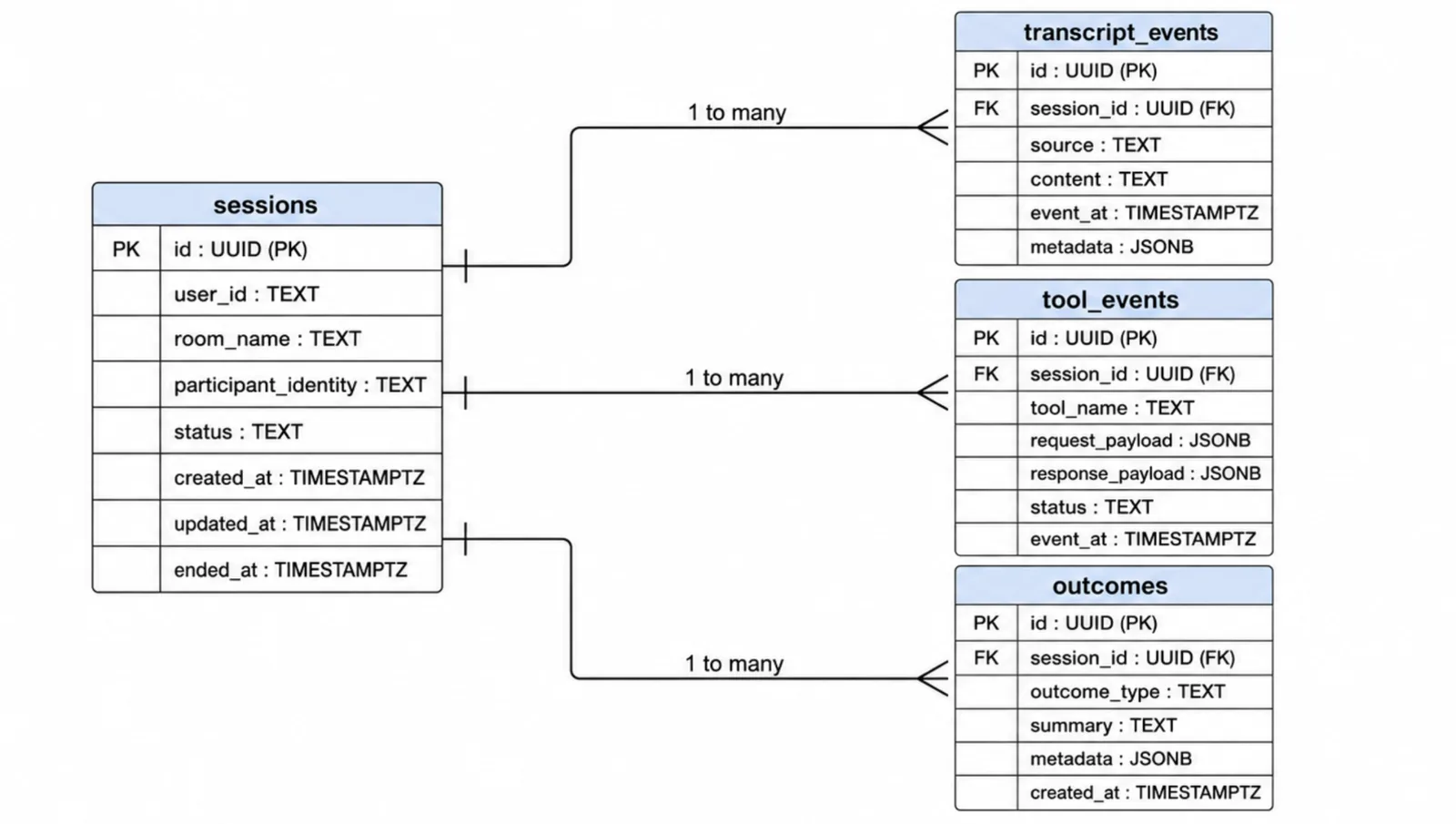
That schema sets up the tables the platform uses for durable records, including sessions, transcript_events, tool_events, and outcomes. Redis is used separately for short-lived runtime context rather than long-term storage.
Once the dependencies are installed and the backing services are up, you can start the whole stack with:
Once the dependencies are installed and the backing services are running, start the complete development stack with:
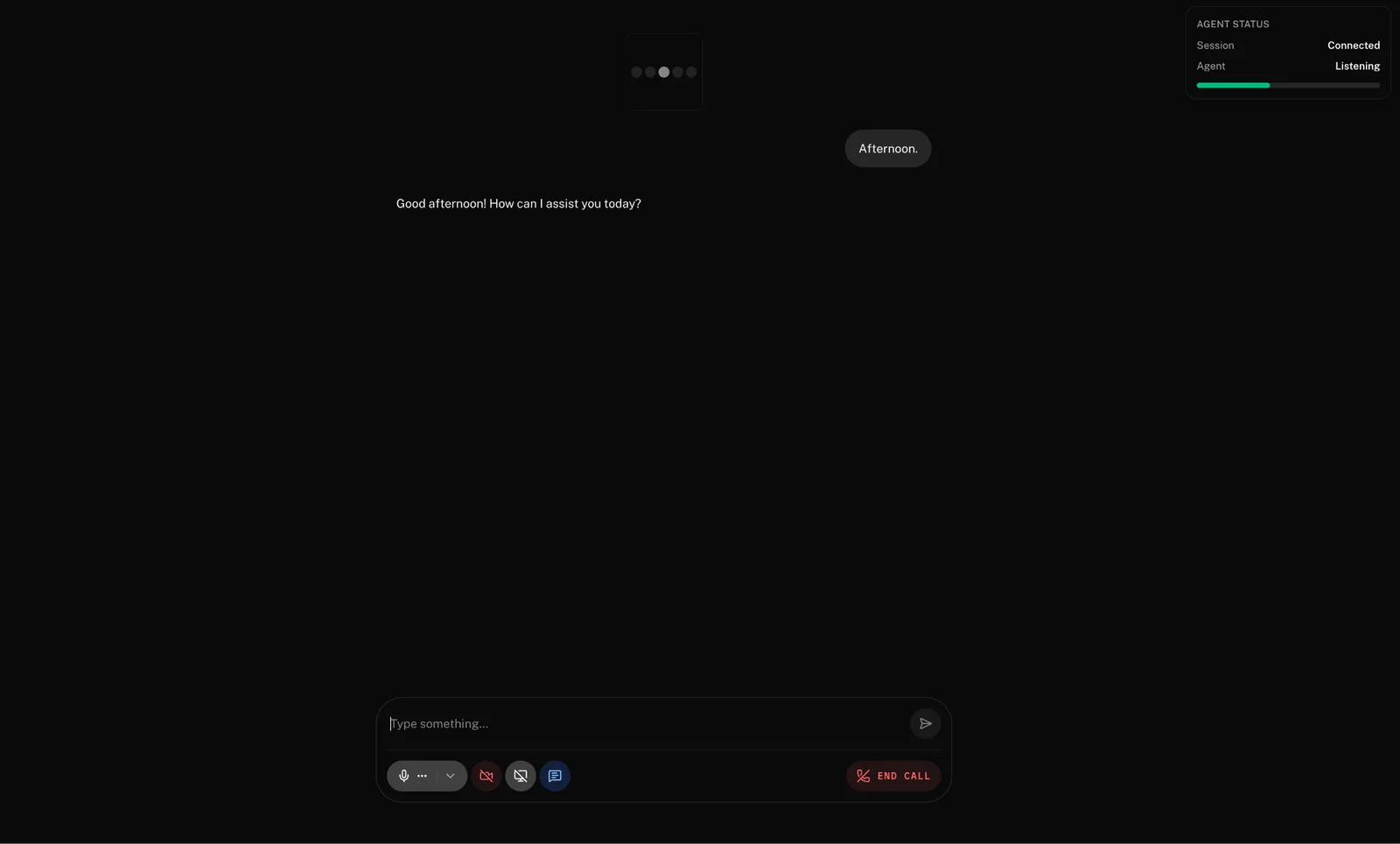
npm run devThen open http://localhost:3000 in your browser to view and test the application locally.
Building the agent frontend
For this project, the cleanest starting point is the React starter app rather than building the browser UI from scratch. It includes voice conversation, an audio visualizer, session management with connect and disconnect controls, text chat and transcription display, and sandbox token server support for quick development.
That makes it a strong foundation for a production-oriented frontend because the basics are already there:
- A browser-ready voice UI
- Microphone controls
- Room-wide audio playback
- Session lifecycle wiring
- Agent state and visual feedback.
The starter app can be cloned directly and run locally after installing dependencies and copying the example environment file. The standard flow is:
git clone https://github.com/livekit-examples/agent-starter-react.git
cd agent-starter-react
pnpm install
cp .env.example .env.local
pnpm dev
What the frontend is responsible for
The frontend has four jobs:
- Request a session from the backend
- Connect to the LiveKit room
- Capture microphone input
- Play the agent’s audio and reflect the session state in the UI
Starting a session from the frontend
A simple frontend flow usually begins with a request to the backend’s session endpoint:
// Create LiveKit session
const session = useSession(tokenSource);

// Start/End from UI
return (
    <div>
      <button onClick={() => session.start()} disabled={session.connectionState === 'connected'}>
        Start session
      </button>
      <button onClick={() => session.end()} disabled={session.connectionState !== 'connected'}>
        End session
      </button>
      <p>Connection: {session.connectionState}</p>
    </div>
  );
}
This is the point where the browser asks the backend to bootstrap the conversation. The frontend does not mint its own token or decide room access. That stays on the server side, which is safer and easier to maintain.
Connecting to the room
Once the frontend receives the session response, it can connect to the LiveKit room using the returned token and URL.
The React frontend often wraps the connection lifecycle with LiveKit session helpers rather than working with the room object directly and calling session.start() fetches the token and connects to the room while in the session.end() disconnects and cleans up the interaction.
Microphone controls and audio playback
The microphone and playback experience are two of the most important parts of the frontend.
The ControlBar component gives the user a simple way to turn the microphone on or off, and RoomAudioRenderer handles room-wide audio playback so the agent’s published audio can be heard without hand-rolling playback logic.
This is a big reason to use the starter app or the React components rather than reinventing everything from scratch.
Reflecting the agent state in the UI
A voice interface should also make it obvious what is happening during the session.
LiveKit exposes agent lifecycle states such as connecting, initializing, listening, thinking, speaking, disconnected, and failed, and it recommends using state helpers like canListen and isFinished when building the UI.
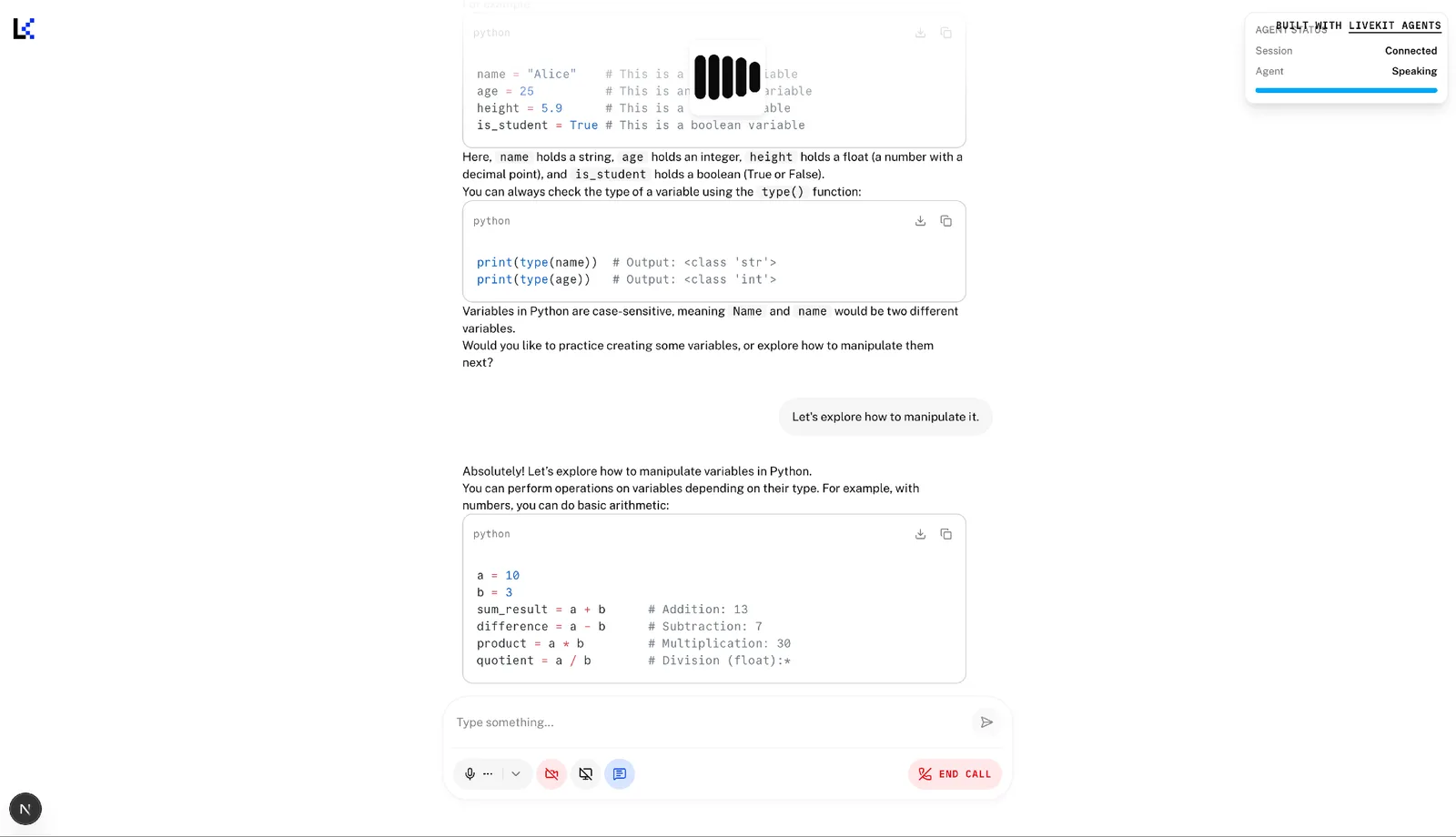
A small state panel can make the session more understandable. That kind of feedback matters more in voice than it does in many text interfaces. Users need to know whether the system is listening, processing, or already speaking.
Handling interruptions
Interruptions are one of the places where voice interfaces start to feel either natural or frustrating.
If the user begins speaking while the agent is still talking, the frontend should not act surprised. It should already be built with the assumption that people interrupt, correct themselves, change their minds mid-sentence, or start speaking before the previous turn has fully settled.
That is why the frontend should treat the agent state as something more than a status label. It should also use it to determine when the microphone is active, when to surface “ready” cues, and when to visually indicate that a new turn is being accepted.
LiveKit’s state model explicitly supports that kind of UI behavior through getters like canListen, which can remain true across multiple active states depending on how the session is configured.
Silence and feedback
Silence is another place where frontend UX quietly matters.
A short pause is normal in conversation. A long pause with no visible feedback often feels like failure. The frontend does not need to overreact to every pause, but it should give enough information for the user to understand whether the system is:
- Waiting for input
- Processing a request
- Responding
- Disconnected or failed
That is one reason the session lifecycle model is useful. Instead of inventing a frontend state machine by hand, the UI can react to the lifecycle already exposed by the session and agent state.
Building the Node.js agent worker
Once the frontend can start a session and the backend can mint a token, the next piece is the worker. This is where the agent actually runs.
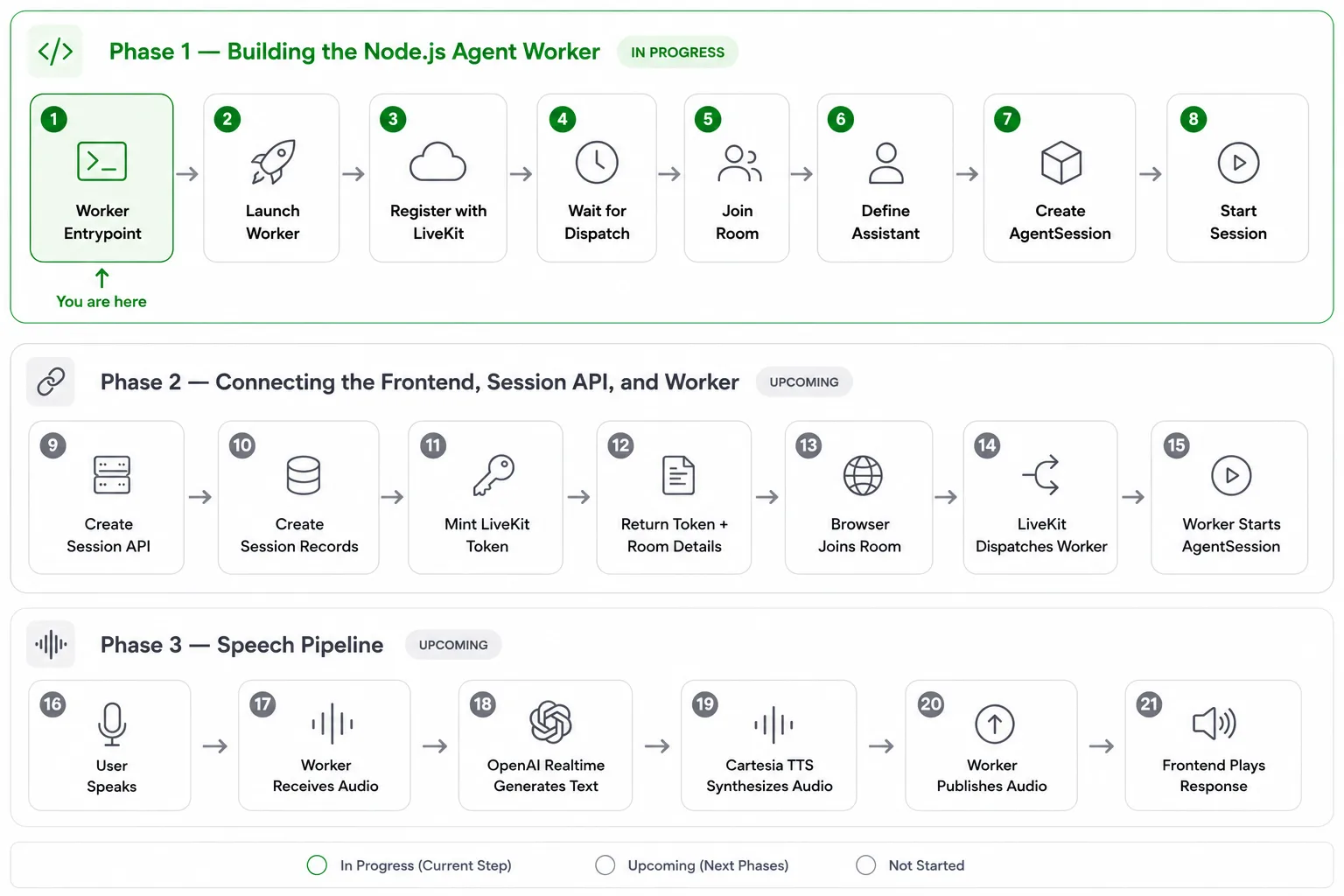
The worker is not a normal HTTP service. It does not wait for browser requests the way the API does. Instead, it registers with LiveKit, waits for a dispatch, joins a room when a session needs an agent, and then runs the live conversation from inside that room. That is the core runtime model in LiveKit Agents: the agent server registers, receives a dispatch request, and starts a job that joins the room to handle the interaction.
What the worker is responsible for
At a practical level, the worker is responsible for:
- Waiting for LiveKit to dispatch a job
- Connecting to the room
- Creating the AgentSession
- Starting the assistant inside that session
- Handling the live conversation loop
- Later, wiring in the model, TTS, and tools
It helps to think of the worker as the runtime plane of the voice system. It sits inside the session and stays close to the conversation itself.
Creating the worker entrypoint
In the Node.js SDK, a worker starts with defineAgent(...) and is launched with cli.runApp(...). A minimal worker entrypoint looks like this:
import { cli, defineAgent, JobContext, WorkerOptions } from "@livekit/agents";

export default defineAgent({
 entry: async (ctx: JobContext) => {
   await ctx.connect();
   console.log(`Worker joined room: ${ctx.room.name}`);
 },
});
cli.runApp(new WorkerOptions({ agent: import.meta.url }));
Even though this is small, it already shows the key lifecycle:
- The worker process starts
- LiveKit dispatches a job to it
- The worker connects to the assigned room
The worker does not create the room. That has already happened through the session flow. It joins the room once the session is ready for the agent.
Adding the assistant definition
Once the worker can join the room, the next step is to define the assistant that will run inside the session.
In LiveKit’s agent model, the assistant is typically created as a voice. An agent with instructions that shape how it behaves. Those instructions are not the entire application, but they do define how the assistant should speak, how concise it should be, and how it should handle tools and external data. A simple implementation might look like this:
import { voice } from "@livekit/agents";
export class Assistant extends voice.Agent {
 constructor() {
   super({
     instructions: `
You are a concise and practical voice assistant.
Respond clearly and naturally.
Use tools only when needed.
Do not invent external facts or tool results.
     `,
   });
 }
}
That gives the worker an actual agent to run during the session.
Creating the AgentSession
The next piece is the AgentSession. This is the main runtime container for the conversation. It is where the worker brings together the room connection, the assistant, and the speech/model configuration. A basic session can start like this:
import { voice } from "@livekit/agents";
import * as openai from "@livekit/agents-plugin-openai";

export function createSession() {
 return new voice.AgentSession({
   llm: new openai.realtime.RealtimeModel({
     modalities: ["text"],
   }),
 });
}
At this stage, the important part is not every option in the session. The important part is understanding that the worker owns it. Once the worker joins the room, it creates and starts the session.
Starting the session in the room
Now the worker can bring the pieces together. A complete worker flow looks like this:
import { cli, defineAgent, JobContext, WorkerOptions, voice } from "@livekit/agents";
import * as openai from "@livekit/agents-plugin-openai";

class Assistant extends voice.Agent {
 constructor() {
   super({
     instructions: `
You are a concise and practical voice assistant.
Speak naturally and keep responses helpful.
     `,
   });
 }
}

export default defineAgent({
 entry: async (ctx: JobContext) => {
   await ctx.connect();

   const session = new voice.AgentSession({
     llm: new openai.realtime.RealtimeModel({
       modalities: ["text"],
     }),
   });

   await session.start({
     room: ctx.room,
     agent: new Assistant(),
   });

   await session.generateReply({
     instructions: "Greet the user and ask how you can help."
   });
 },
});

cli.runApp(new WorkerOptions({ agent: import.meta.url }));
This is the first point at which the worker becomes a real agent runtime rather than just a connected process. The sequence is:
- Connect to the dispatched room
- Create the session
- Start the session with the room and the assistant
- Generate the first reply
At this stage, the system now has a clear path:
- The frontend asks the backend to start a session
- The backend returns the room details and the token
- The browser joins the room
- LiveKit dispatches the worker
- The worker joins the room and starts the AgentSession
That is the handoff point between the control plane and the runtime plane. The API gets the session ready. The worker takes over once the conversation begins.
Connecting the frontend, session API, and worker
With the project skeleton in place, the next step is to make the three parts of the system actually talk to each other.
Once these pieces are connected, a user can start a session in the browser, the server can mint a LiveKit token and return the room details, and the worker can be dispatched into that room to run the agent.
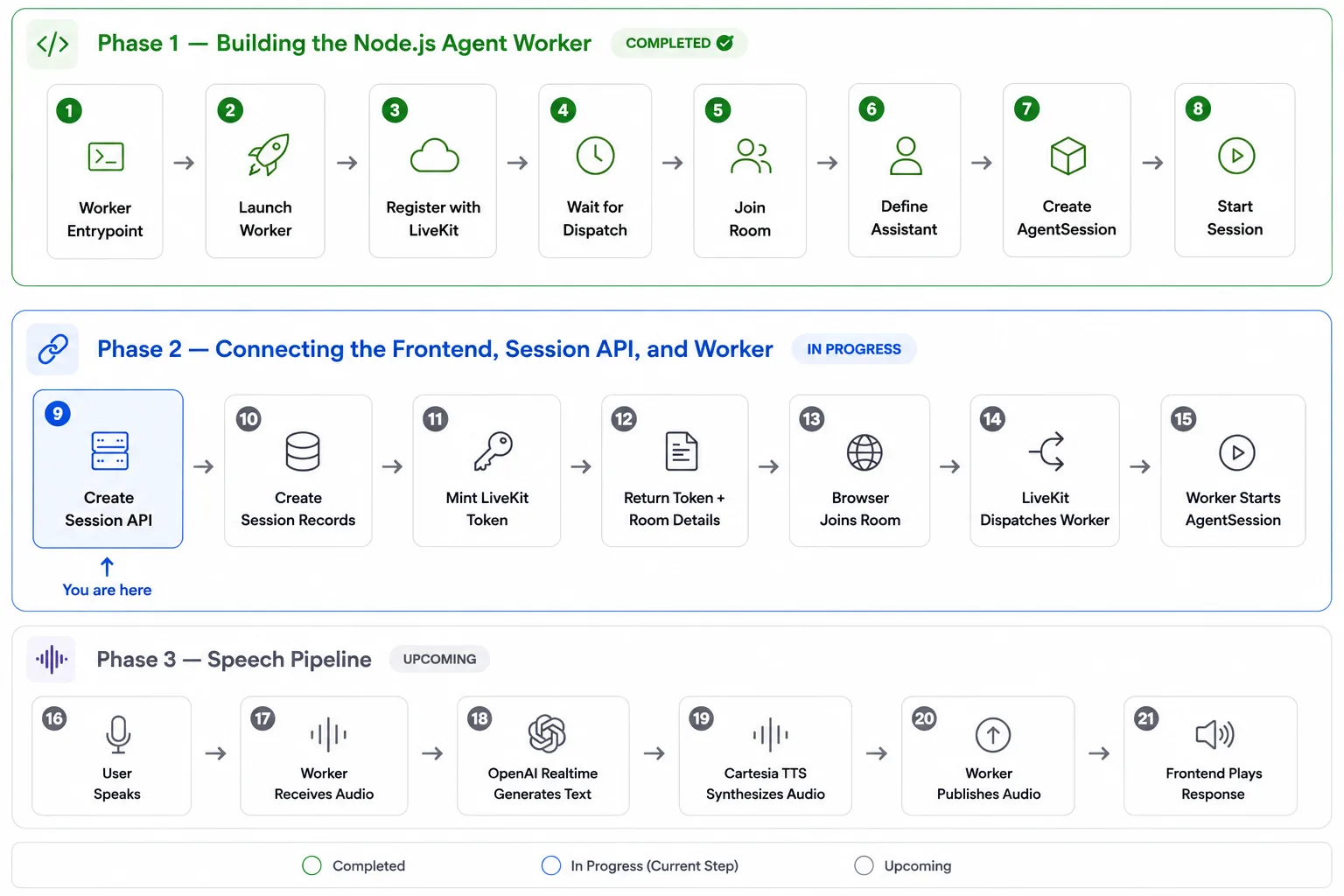
1\. The frontend asks the backend to start a session
When the user clicks Start conversation, the browser sends a POST request to/session/start. The backend responds with the values the frontend needs to connect: a token, the LiveKit server URL, and the room name.
A frontend flow like this works well:
'use client';
import { useMemo, useRef } from 'react';
import { TokenSource } from 'livekit-client';
import { useSession } from '@livekit/components-react';
const API_BASE_URL = process.env.NEXT_PUBLIC_API_BASE_URL ?? 'http://localhost:4000';
export function VoiceApp() {
 const userIdRef = useRef(`web-${Math.random().toString(36).slice(2, 10)}`);

 const tokenSource = useMemo(() => {
   return TokenSource.custom(async () => {
     const response = await fetch(`${API_BASE_URL}/session/start`, {
       method: 'POST',
       headers: { 'content-type': 'application/json' },
       body: JSON.stringify({
         userId: userIdRef.current,
         channel: 'web',
         context: {
           timezone: Intl.DateTimeFormat().resolvedOptions().timeZone,
           locale: navigator.language
         }
       })
     });

     if (!response.ok) throw new Error(`Session start failed: ${response.status}`);
     const data = await response.json();

     return {
       serverUrl: data.livekitUrl,
       participantToken: data.token
     };
   });
 }, []);

 const session = useSession(tokenSource);

 return <button onClick={() => session.start()}>Start conversation</button>;
}
This is a nice pattern because the frontend stays simple. It does not need to know how tokens are created or how dispatch works. It just knows how to ask for a session and start one.
2\. The session API creates the token and includes dispatch instructions
On the backend, the session API does more than issue a participant token. It also tells LiveKit to dispatch an agent into this room.
That happens through roomConfig.agents. This is the part that connects the control plane to the runtime. The API not only lets the user into a room, but also tells LiveKit which agent worker should be assigned to that room.
A simple token-minting helper looks like this:
import { AccessToken, type VideoGrant } from 'livekit-server-sdk';
import { RoomAgentDispatch, RoomConfiguration } from '@livekit/protocol';
import { env } from '../config/env';

export const mintParticipantToken = async ({
 roomName,
 participantIdentity
}: {
 roomName: string;
 participantIdentity: string;
}) => {
 const grant: VideoGrant = {
   room: roomName,
   roomJoin: true,
   canPublish: true,
   canSubscribe: true,
   canPublishData: true
 };

 const token = new AccessToken(env.LIVEKIT_API_KEY, env.LIVEKIT_API_SECRET, {
   identity: participantIdentity,
   ttl: '3600s'
 });

 token.addGrant(grant);

 token.roomConfig = new RoomConfiguration({
   agents: [new RoomAgentDispatch({ agentName: env.LIVEKIT_AGENT_NAME, metadata: '{}' })]
 });

 return token.toJwt();
};
And a simple session endpoint might look like this:
app.post('/session/start', async (req, res) => {
 const roomName = `voice-${req.body.userId}-${Date.now()}`;
 const token = await mintParticipantToken({
   roomName,
   participantIdentity: `user-${req.body.userId}`
 });

 res.json({
   roomName,
   token,
   livekitUrl: process.env.LIVEKIT_URL
 });
});
The important thing here is not just token creation. It is that the session API also embeds the agent dispatch config in the token flow.
3\. The worker registers itself as an agent runtime
The browser does not create the worker. It is already running and registered with LiveKit before any user starts a session.
When the worker starts, it registers itself using its configured agentName. That name has to match the value the session API uses in roomConfig.agents. If those do not match, the room may be created successfully, but the worker will never be dispatched into it.
A worker registration setup can look like this:
import { WorkerOptions, cli } from '@livekit/agents';
import { fileURLToPath } from 'node:url';
import { env } from './config/env';
const opts = new WorkerOptions({
 agent: fileURLToPath(new URL('./agent/entry.ts', import.meta.url)),
 wsURL: env.LIVEKIT_URL,
 apiKey: env.LIVEKIT_API_KEY,
 apiSecret: env.LIVEKIT_API_SECRET,
 agentName: env.LIVEKIT_AGENT_NAME
});

cli.runApp(opts);
This is what lets LiveKit treat the worker as a registered agent runtime instead of just another backend process.
4\. The worker joins the room and starts the voice runtime
Once the room is active and dispatch happens, the worker receives the job, joins the room, and starts the live conversation runtime.
This is where the agent actually becomes active. Inside the AgentSession, the worker uses OpenAI Realtime in text mode for understanding and response generation, and Cartesia Sonic-3 for the final speech output. That is the half-cascade design at work.
A worker entry can look like this:
import { voice, defineAgent, inference, type JobContext } from '@livekit/agents';
import * as openai from '@livekit/agents-plugin-openai';

export default defineAgent({
 entry: async (ctx: JobContext) => {
   await ctx.connect();
   await ctx.waitForParticipant();

   const session = new voice.AgentSession({
     llm: new openai.realtime.RealtimeModel({
       model: process.env.OPENAI_REALTIME_MODEL!,
       apiKey: process.env.OPENAI_API_KEY!,
       modalities: ['text']
     }),
     tts: new inference.TTS({
       model: 'cartesia/sonic-3',
       voice: process.env.CARTESIA_VOICE_ID!,
       language: process.env.CARTESIA_LANGUAGE ?? 'en'
     }),
     turnHandling: {
       turnDetection: 'realtime_llm'
     }
   });

   const agent = new voice.Agent({
     instructions: `You are a general-purpose voice assistant.`
   });

   await session.start({
     room: ctx.room,
     agent,
     inputOptions: { audioEnabled: true, textEnabled: true }
   });
 }
});
At this point, the worker is inside the room as the agent participant, listening to the user and streaming responses back into the same session.
5\. Why does the browser hear the agent automatically
Once the worker publishes audio into the room, the frontend does not need any custom playback channel to hear it. The agent is already a participant in the same LiveKit room, so the browser just plays the subscribed audio track like any other audio in the room.
That is why the frontend can stay so clean here. RoomAudioRenderer handles the playback side for you:
import { SessionProvider, RoomAudioRenderer } from '@livekit/components-react';

export function AgentSessionProvider({ session, children }: any) {
 return (
   <SessionProvider session={session}>
     {children}
     <RoomAudioRenderer />
   </SessionProvider>
 );
}
Once the worker starts speaking, the frontend automatically hears it throughout the room.
Configuring OpenAI Realtime for text-only response generation
The first important speech decision in this architecture is that OpenAI Realtime is not being used as the final voice output engine.
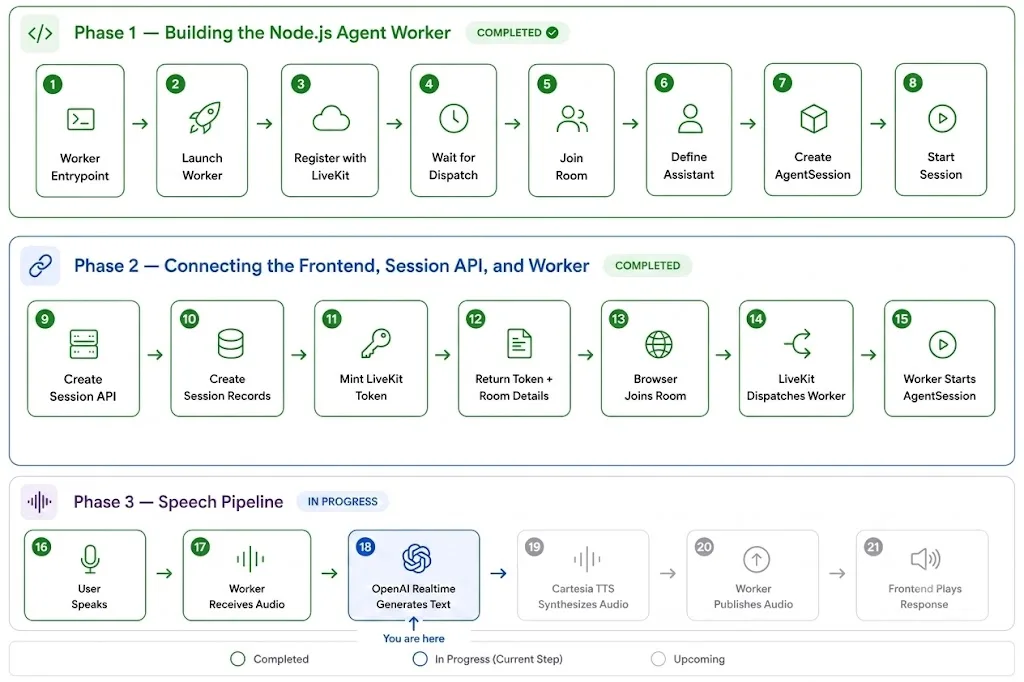
Instead, it is configured to return text only. That sounds counterintuitive at first. If the model supports real-time audio, let it produce the final spoken response too. The answer is control.
In this setup, OpenAI Realtime is responsible for the part it excels at: live speech understanding and low-latency response generation. The final spoken output is handled separately in the next layer.
That means the model still sits inside a real-time conversation loop. It still receives live audio, still benefits from built-in turn detection, and still generates the response content. What changes is simply the output boundary: instead of returning final audio, it returns text that the rest of the speech stack can work with.
Why this matters:
- It keeps response generation fast and conversational.
- It avoids mixing model-generated audio with your dedicated TTS voice.
- It enforces a clean half-cascade split:
- OpenAI Realtime = understanding + response text
- Cartesia Sonic-3 = final synthesized speech
This makes it easier to control voice consistency, brand tone, and voice switching in production.
How it is configured
In the worker, OpenAI Realtime is attached as the LLM inside AgentSession, and modalities are explicitly set to \['text'\].
import { voice, inference } from '@livekit/agents';
import * as openai from '@livekit/agents-plugin-openai';
const session = new voice.AgentSession({
  // OpenAI Realtime for low-latency reasoning and text generation
  llm: new openai.realtime.RealtimeModel({
    model: process.env.OPENAI_REALTIME_MODEL ?? 'gpt-realtime',
    apiKey: process.env.OPENAI_API_KEY!,
    modalities: ['text'] // critical: disables final audio generation from OpenAI
  }),
  // Separate final speech layer
  tts: new inference.TTS({
    model: 'cartesia/sonic-3',
    voice: process.env.CARTESIA_VOICE_ID!,
    language: process.env.CARTESIA_LANGUAGE ?? 'en'
  })
});
Why is this production-friendly
- You can change voices without changing your model layer.
- You can tune latency and interruption behavior independently of TTS voice quality.
- You avoid dual-audio ambiguity from multiple synthesis sources.
- You preserve a single source of truth for spoken output (Cartesia), which is better for QA and branding.
When implementing this pattern, verify:
- Modalities: \['text'\] is set on RealtimeModel.
- A separate TTS engine is configured in AgentSession.
- You do not call any OpenAI audio output path for final playback.
- Frontend audio playback comes from LiveKit room tracks only
Adding Cartesia as a separate TTS layer
Once OpenAI Realtime is configured to return text, the next step is to decide how to convert that text to speech. In this architecture, that job belongs to Cartesia.
Rather than asking the real-time model to generate the final audio itself, the session is configured with Cartesia Sonic-3 as the TTS engine. That means the model handles understanding and response generation, while Cartesia handles the final spoken output. It is a small configuration change, but it makes the speech layer much more deliberate.
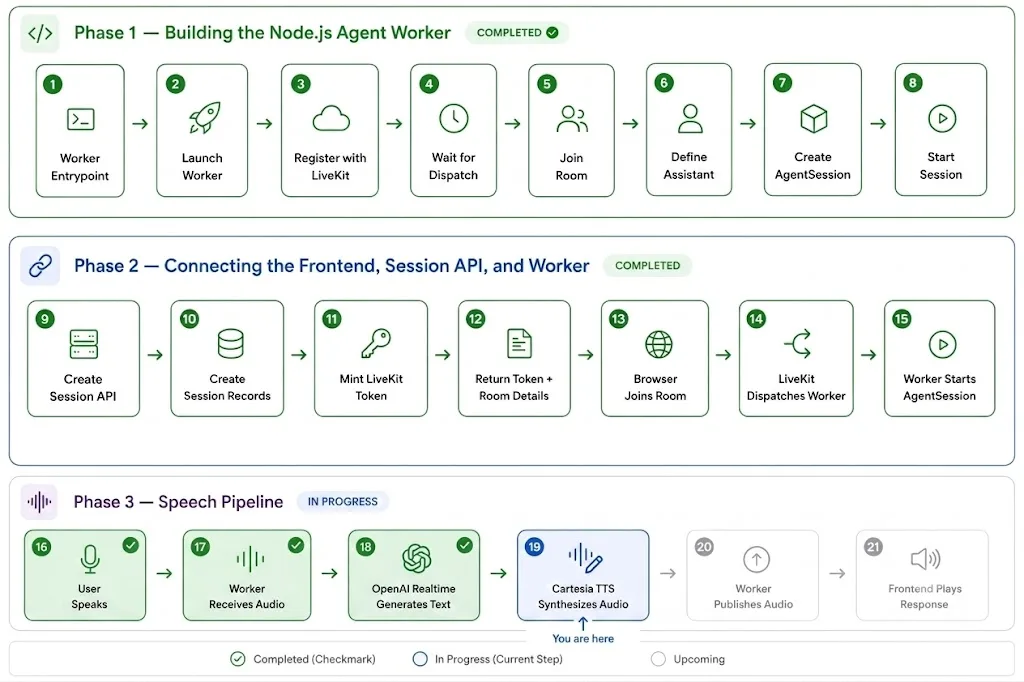
LiveKit supports this directly by allowing a separate TTS instance to be attached to the AgentSession, and its project for a real-time text-only model uses tts: "cartesia/sonic-3".
This keeps voice synthesis independent from model reasoning, which is ideal for production voice quality and brand consistency.
How Cartesia is wired in this project
Cartesia is attached as the TTS component of AgentSession using LiveKit inference TTS.
import { voice, inference } from '@livekit/agents';
import * as openai from '@livekit/agents-plugin-openai';

const session = new voice.AgentSession({
  // Model layer: text output only
  llm: new openai.realtime.RealtimeModel({
    model: process.env.OPENAI_REALTIME_MODEL ?? 'gpt-realtime',
    apiKey: process.env.OPENAI_API_KEY!,
    modalities: ['text']
  }),

  // Speech layer: Cartesia Sonic-3
  tts: new inference.TTS({
    model: 'cartesia/sonic-3',
    voice: process.env.CARTESIA_VOICE_ID!,
    language: process.env.CARTESIA_LANGUAGE ?? 'en'
  })
});
With this separation, you can now:
- You can tune or swap voice identities without affecting LLM behaviour.
- You can keep one consistent branded voice across prompts/models.
- You avoid “who produced this audio?” ambiguity in debugging.
- You can evaluate TTS quality and latency as a separate subsystem.
Environment configuration used
# Worker env
CARTESIA_VOICE_ID=9626c31c
CARTESIA_LANGUAGE=en
Even without advanced tuning, though, the main architectural benefit is already there: the final voice output is no longer tightly coupled to the model.
This is what makes the architecture a half-cascade design rather than a full speech-to-speech. The input and reasoning side stays real-time, but the final voice output is delegated to a separate TTS layer.
Wiring the complete speech loop
With OpenAI Realtime configured in text mode and Cartesia handling speech synthesis, the full conversation path becomes much easier to understand.
The worker sits in the middle of two flows happening simultaneously. On one side, it is part of a real-time LiveKit room, receiving the user’s audio and publishing the agent’s audio back into that same session. On the other hand, it coordinates the speech stack: OpenAI Realtime handles understanding and response generation, and Cartesia converts the generated text into final audio.
The flow looks like this:
- The user speaks in the browser
- The browser sends audio into the LiveKit room
- The worker receives that audio through the AgentSession
- OpenAI Realtime processes the speech and generates a response as text
- Cartesia synthesizes that text into audio
- The worker publishes the generated audio back into the room
- The frontend plays the role of the response for the user
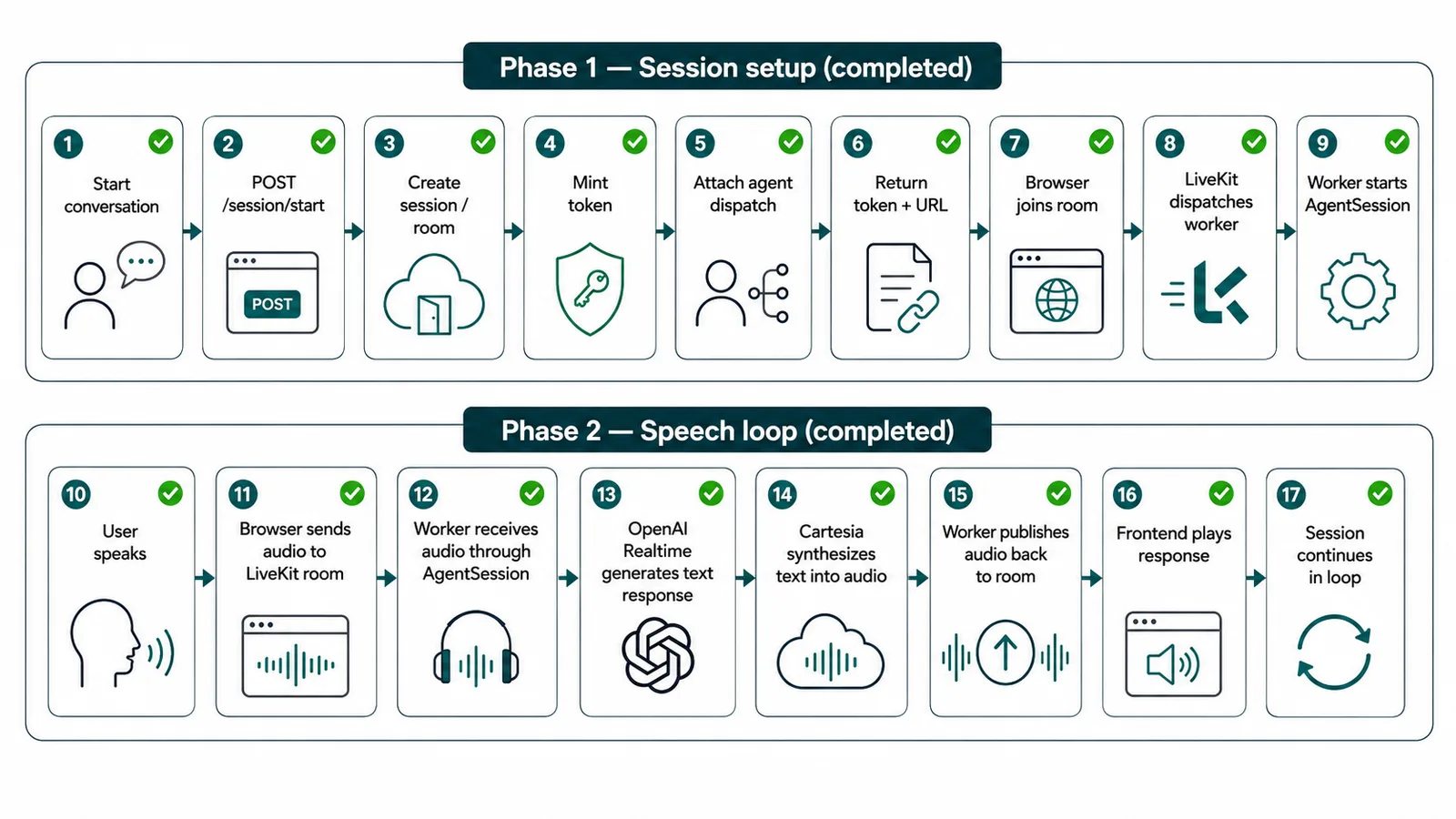
And once tools are added, that same loop simply gets one more step in the middle:

Designing the backend tooling layer
At this point, the voice loop is working: the user speaks, the agent understands the request, and a spoken response comes back. But a voice agent becomes much more useful once it can do more than just have a conversation.
That is where the backend tool layer comes in.
A good way to think about tools is this: the model is responsible for understanding what the user wants, but it should not be responsible for carrying out the actual business action. If a user asks to check appointment availability, look up an order, or create a support ticket, that work should happen in backend code, not inside prompt instructions.
That separation matters for two reasons.
First, it keeps the system reliable. The model can decide when a tool is needed, but the backend can determine how the tool is executed, which validation rules apply, and what to do if something fails.
Second, it keeps business logic in normal application code, where it is easier to test, log, secure, and maintain over time.
What counts as a tool in this architecture
In a voice agent platform, a tool is usually a structured backend capability that the model can call when it needs real data or needs to trigger a real action.
Typical examples include:
- Checking appointment availability
- Fetching a customer record
- Creating a support ticket
- Looking up order status
- Escalating the conversation to a human workflow
The important part is that tools should be deterministic. They should accept clearly defined inputs, run backend code, and return structured results. The model can then decide how to use that result in the conversation.
Why tools should live in backend code
It is tempting to push too much into the model layer. For example, you might be tempted to write prompt instructions like:
If the user asks about appointments, call the booking system and tell them what is available.
But that is not enough on its own. A real application usually needs more than intent recognition. It may need input validation, retries, API authentication, normalization of third-party responses, timeout handling, audit logs, and error recovery. That kind of work belongs in the backend.
A cleaner design is:
- The model decides which tool to call
- The tool definition decides what input shape is allowed
- The service module decides how the actual business action runs
- The tool returns structured data
- The model uses that result to respond naturally
That keeps the language and application layers from bleeding into each other.
Defining a tool clearly
A tool should have three things:
- A clear name
- A clear input schema
- A deterministic execution function
A simple example is an availability check.
import { z } from "zod";
import { bookingService } from "../services/booking.service";
export const checkAvailabilityTool = {
 name: "check_availability",
 description: "Check available appointment slots for a given date and time period",
 parameters: z.object({
   date: z.string().describe("Requested appointment date"),
   period: z.enum(["morning", "afternoon", "evening"]),
 }),
 execute: async ({ date, period }: { date: string; period: "morning" | "afternoon" | "evening" }) => {
   const slots = await bookingService.checkAvailability(date, period);

   return {
     date,
     period,
     slots,
   };
 },
};
This is a good starting pattern because the tool is easy to understand. The model sees the tool name and description; the input is validated with Zod; and the execution path is delegated to a service module rather than being buried directly in the session code.
Keeping business logic in service modules
The tool should not contain all the business logic itself.
Instead, tools should stay thin and call service modules that own the real work. That makes the code easier to test and reuse, and it keeps the worker layer from turning into a giant pile of mixed responsibilities.
This is where backend logic belongs:
- Talking to external APIs
- Handling auth tokens
- Normalizing responses
- Throwing useful errors when something goes wrong
That keeps the tool focused on the contract and the service focused on execution.
Returning structured results
One of the easiest ways to make tool use brittle is to return free-form strings from the backend and hope the model interprets them correctly. A better pattern is to return structured data.
For example:
const result = await checkAvailabilityTool.execute({
 date: "2026-04-30",
 period: "afternoon",
});

console.log(result);
Which might produce:
{
 "date": "2026-04-30",
 "period": "afternoon",
 "slots": [
   {
     "id": "slot_123",
     "startTime": "2026-04-30T14:00:00Z",
     "endTime": "2026-04-30T14:30:00Z"
   },
   {
     "id": "slot_124",
     "startTime": "2026-04-30T16:00:00Z",
     "endTime": "2026-04-30T16:30:00Z"
   }
 ]
}
That gives the model something much easier to work with than an unstructured paragraph. It also makes downstream logging and debugging much cleaner.
Service boundaries matter
As the number of tools grows, service boundaries start to matter more. A useful pattern is to group tools around application capabilities, not around model behavior. For example:
- booking.service.ts for appointments
- customer.service.ts for customer lookups
- ticket.service.ts for support workflows
- handoff.service.ts for escalation
That keeps the worker from becoming the place where all business logic lives. The worker should coordinate the conversation runtime. It should not become the only place where application rules are implemented.
Handling failures safely
Tools also need to fail cleanly. If an external system is down or a request times out, the model should not invent a result just to keep the conversation smooth. The safer pattern is:
- Validate the input
- Call the tool
- If it fails, return a structured error or throw a controlled exception
- Let the conversation layer respond appropriately
For example:
export const checkAvailabilityTool = {
 name: "check_availability",
 description: "Check available appointment slots for a given date and time period",
 parameters: z.object({
   date: z.string(),
   period: z.enum(["morning", "afternoon", "evening"]),
 }),
 execute: async ({ date, period }: { date: string; period: "morning" | "afternoon" | "evening" }) => {
   try {
     const slots = await bookingService.checkAvailability(date, period);
     return { ok: true, date, period, slots };
   } catch (error) {
     return {
       ok: false,
       error: "availability_lookup_failed",
       message: "Unable to retrieve appointment availability right now.",
     };
   }
 },
};
This gives the rest of the runtime a safer result to work with. The agent can then say something like, “I’m having trouble checking availability right now,” instead of confidently making something up.
Without tools, your agent can still hold a conversation. With tools, it starts becoming a useful application.
The worker is no longer just listening and speaking; they are now engaged in active listening. It now has a path to real backend actions. It can fetch data, trigger workflows, and return grounded results into the conversation, rather than relying entirely on language generation.
Persistence and session state management
Once the agent can handle live conversations and call back-end tools, the next question is where all that state should live. A voice session produces more data than it may seem at first. There is the session itself, the transcript, tool calls, outcomes, and all the small pieces of runtime context that help the agent stay grounded while the conversation is still active. Not all of that data belongs in the same place.
The state can be split into two layers:
Durable state (PostgreSQL) for canonical records and analytics
Ephemeral state (Redis) for short-lived runtime context and coordination
1\. Durable session + event model (Postgres)
Postgres holds the source of truth for the conversation lifecycle and outcomes:
- Sessions - canonical session identity + status
- Transcript events - turn-level text events
- Tool events - tool call request/response audit
- Outcomes - summarized lifecycle/business outcomes
2\. Session bootstrap writes both durable and ephemeral state
When /session/start is called, a session row is created with status='created'
Redis receives a bootstrap state object (room, identity, request id, context)
3\. Worker advances lifecycle to active/ended. When the worker joins and resolves the session:
Postgres is updated to active, and the Redis context is updated to connected state
On session close/disconnect: Postgres transitions to ended, and Redis context is merged with close/disconnect info, then cleaned up.
4\) Redis helpers for runtime-safe state handling
A robust ephemeral layer needs read/update/delete operations, not just set.
export const readSessionState = async (sessionId: string) => {
  const raw = await redis.get(`voice-session-state:${sessionId}`);
  return raw ? JSON.parse(raw) : null;
};

export const mergeSessionState = async (sessionId: string, partial: Record<string, unknown>) => {
  const current = (await readSessionState(sessionId)) ?? {};
  const next = { ...current, ...partial, updatedAt: new Date().toISOString() };
  await writeSessionState(sessionId, next);
};

export const deleteSessionState = async (sessionId: string) => {
  await redis.del(`voice-session-state:${sessionId}`);
};
It can be tempting to put everything into one place, especially at the beginning.
But if everything goes into Postgres, the system can become slower and noisier than it needs to be. A temporary state that only matters for a few minutes starts filling permanent tables. On the other hand, if too much is stored in Redis, you lose the durable history that enables debugging and later analytics.
That split is also how this platform is structured: Postgres stores conversation and tool telemetry, while Redis is used for ephemeral workflow and session context.
Observability, debugging, and evaluation
Once a voice agent starts handling real conversations, observability becomes mandatory. It becomes part of the product.
A system like this is not production-ready just because it sounds natural or responds quickly. It becomes production-ready when you can see what happened in a session, understand where something broke, and improve it without guessing.
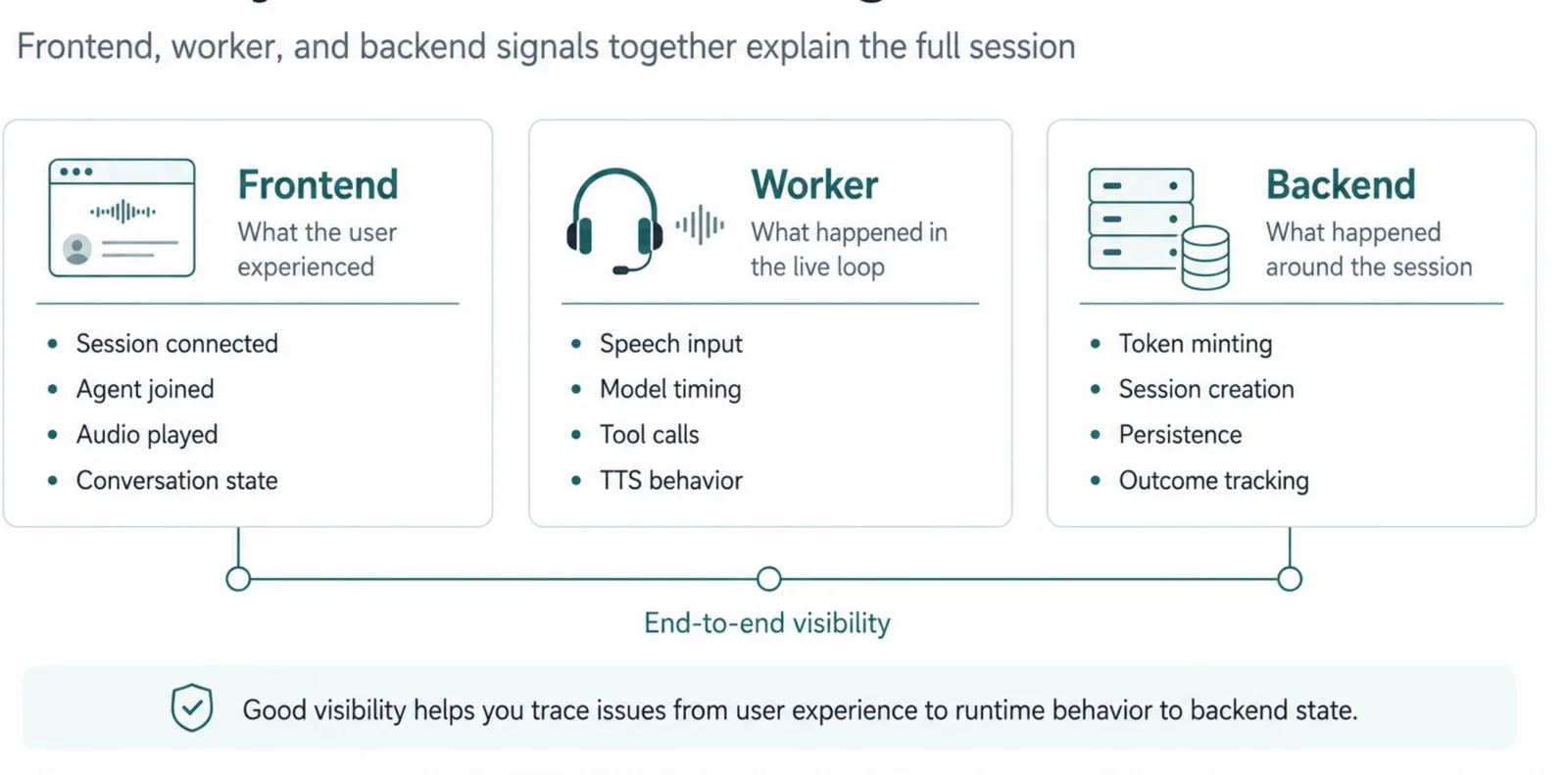
In this architecture, visibility needs to span the entire stack.
The frontend shows what the user experienced: whether the session connected, whether the agent joined, whether audio played, and the conversation's state. The worker shows what happened inside the live loop, speech input, model timing, tool calls, interruptions, and TTS behavior. And the backend shows the surrounding session lifecycle, token minting, session creation, persistence, and outcome tracking.
What to log at a minimum
The most useful logs are those that let you reconstruct a session later without having to read between the lines.
At a minimum, every event should carry a stable sessionId and roomName, and the system should log:
- Session lifecycle events, such as created, active, ended, and closed reasons
- Agent lifecycle events such as connecting, listening, thinking, speaking, and failing
- User activity signals such as speaking, silence, or stepping away
- Tool events, including tool name, validated input, result status, and any errors
- Error events with the source of the error, whether that came from the model, TTS, transport, or database
- Proactive UX events such as nudges or clarification prompts
- Request correlation fields like requestId and participantIdentity
That kind of logging gives you a session timeline instead of a pile of disconnected messages.
Logging transcript and tool activity
Basic logs are helpful, but durable event records are what make debugging and analysis possible later.
If you want to understand how the agent behaved during a session, you need more than “tool failed” or “model responded.” You need to know what the model asked for, what tool was called, what input was sent, and what came back. That is what makes postmortems much easier.
A tool call, for example, should be logged and persisted in a structured way:
logger.info({ sessionId, args }, 'tool call: checkAvailability');

const result = await checkAvailability(args);

await writeToolEvent({
 sessionId,
 toolName: 'checkAvailability',
 requestPayload: args,
 responsePayload: result,
 status: 'ok'
});
Measuring latency in the speech loop
Latency is one of the easiest things to oversimplify in a voice system.
It is tempting to talk about latency as one number, but in practice, it is a pipeline. If the system feels slow, you need to know where the delay is coming from.
A more useful breakdown is:
- User end-of-utterance \> model first token
- Model first token \> TTS start
- TTS start \> first audio frame published
- Published audio \> audible playback starts in the browser
That gives you much more actionable signals than a single end-to-end timing number.
Frontend debugging signals
Your frontend debugging should answer a very practical set of questions:
- Did the session connect?
- Did the agent join the room?
- Did audio playback actually happen?
- Was the UI showing the correct state?
The frontend does not need to expose every internal detail, but it should surface enough to make the session understandable.
At a minimum, it should reflect:
- Session connection state, such as connecting, connected, reconnecting, and disconnected
- Agent states such as listening, thinking, speaking, and failing
- Visible failure reasons when something goes wrong
- Development-friendly debug signals when needed
This is especially important in voice interfaces, where users rely on timing and feedback much more than in text interfaces. If the UI is silent or ambiguous, even a healthy system can feel broken.
Storing outcomes, not just raw events
Event streams are useful, but they can quickly become noisy.
That is why it helps to store outcomes as explicit records rather than relying only on low-level logs. Outcomes make reporting easier because they capture what the session meant at a product level.
Good examples include:
- session_started
- session_ended
- task_completed
- task_failed
- handoff_triggered
- user_dropped_after_nudges
For example:
The point here is not to record every tiny transition as an outcome. It is to record the boundaries that matter.
What evaluation should focus on
A voice agent should not be evaluated only on whether it sounds natural.
That matters, but it is not enough. A system like this should be judged by whether people can actually use it successfully and whether it behaves reliably in real conditions.
The most useful evaluation areas are:
- Task success rate - did the user get what they came for?
- Turn latency - especially p50, p95, and p99
- Interruption quality: did the system correctly detect real interruptions, or did it cut users off unnecessarily?
- Tool correctness - were the right tools called with the right parameters, and were the results used properly?
- Hallucination rate - especially around actions that depend on external systems
- Recovery quality - how well did the system handle silence, network issues, or failed tools?
These are the signals that affect trust. A voice assistant can sound polished yet still fail if it is slow, unreliable, or careless in its interactions with external systems.
Conclusion
What makes a voice agent feel real is not just that it can listen and respond. It is that the whole system around it holds together.
That is really the value of this architecture. Each part has a clear job. LiveKit handles the real-time session and room flow. OpenAI Realtime handles the fast response loop. Cartesia handles the final voice output. Around that, the API, worker, Postgres, and Redis give the platform the structure it needs to run like a real application rather than a stitched-together demo.
The result is a setup that is fast enough to feel conversational, but also structured enough to debug, monitor, and improve over time. It gives you room to add tools, tighten guardrails, support new channels, and properly evaluate behaviour without tearing the whole thing apart.
If there is one idea worth carrying forward, it is this: voice AI works better when you treat it like a system, not just a model. Once the pieces are clearly separated and each turn is easier to observe, building on top of them becomes much less fragile.
For the full implementation, including the frontend, session API, worker runtime, and supporting services, refer to the project's GitHub repository.
Brands Our Founder Previously Worked With:





Related articles
Enhancing Web Experiences with the View Transitions API
Discover how the View Transitions API enhances web experiences with seamless animations and smooth page transitions, improving user engagement and performance.
State of AI Coding Agents in 2026
AI coding agents in 2026: from autocomplete to orchestration — long-running agents, multi-agent systems, security stakes, and leading platforms.